Dbmovies
Sources domain exchanger
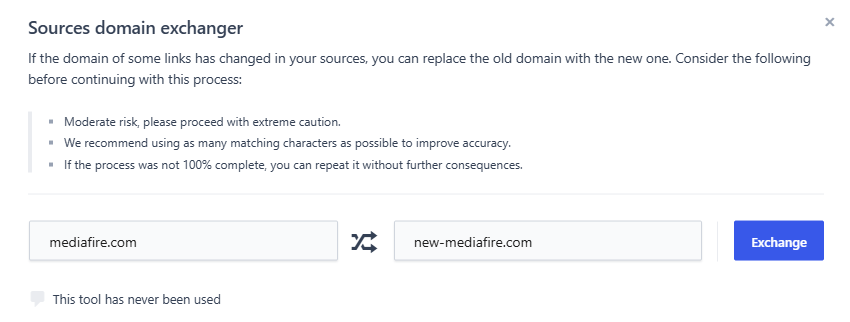
The Sources domain exchanger replaces a domain in all your links at once, for example when a host moves to a new domain. This page explains how the replacement works, what to type so it only changes the right links, and what to do afterwards.
Overview
Hosts change their domain from time to time, for example from streamhost.com to streamhost.to. When that happens, every link you have on the old domain stops working. The Sources domain exchanger replaces the old domain with the new one in all your links at once, so you do not have to edit them one by one.
You find it in Dbmovies › Tools, or in the Tools menu of Dbmovies › Links (Domain exchanger). Only administrators can use it.
How the replacement works
The tool looks for the exact text you type in Old domain inside the address of every link, and replaces it with the text in New domain.
- It matches text, not whole domains. The text is replaced wherever it appears in the address, also as part of a longer domain or of a path.
- It is exact. Upper and lower case must match.
- It changes the address of the link only. Subtitles, quality, language, password and the other details of each link stay as they are. Your titles are not touched.
You can type a domain, such as streamhost.com, or the start of an address, such as https://streamhost.com/.
Type as much as you can
Because it matches text, a short value can change links you did not want to change. Include the protocol and the slash at the end:
| You type in Old domain | It also changes |
|---|---|
host.co | Links on host.com, myhost.co and cdn.host.co |
host.co/ | Links on myhost.co/ and cdn.host.co/ |
https://host.co/ | Only links that start with https://host.co/ |
If your links use more than one form of the address, such as https://host.co/ and https://www.host.co/, run the tool once for each form.
Exchanging a domain
- Make a backup of your database.
- Go to Dbmovies › Tools › Sources domain exchanger.
- Type the current address in Old domain, for example
https://streamhost.com/. - Type the new address in New domain, for example
https://streamhost.to/. - Click Exchange.
The exchange runs as soon as you click Exchange, without asking for confirmation, and changes all the matching links at once. Check what you typed before clicking.
The panel shows how many links were updated. Under the button, it keeps the result of the last exchange and how long ago it ran.
- "No matches were found, no rows were altered." No link contains that text. Check upper and lower case, and the
www.part. - "You can only exchange valid domain names or URLs." Both fields need a domain with its extension, such as
.com, optionally with the protocol and a path.
Undoing an exchange
You can run the tool again with the two domains swapped. This only gives back the original links if none of your links used the new domain before the first exchange: otherwise, those links change too.
That is why the backup matters: it is the only sure way back.
After the exchange
- Check the health of your links. Their health scores are from the old domain. Run Analyze link health to check them against the new one.
- Clear your cache. If your site uses a page cache or a CDN, clear it so your visitors get the new links.