Dbmovies
Importers
The importer brings movies and TV shows from TMDb into your site, one by one or in bulk. This page explains the importer screen, what each import brings, Quick import, the importer tools and settings, and how to solve common problems.
Overview
The importer is where you find movies and TV shows on TMDb and bring them into your site. Each import creates a title that is ready to publish: synopsis, poster and backdrops, genres, cast and crew, trailer, and TMDb and IMDb ratings.
You can import titles in three ways:
- From the importer: search or browse TMDb, then import titles one by one or a whole page at once.
- With Quick import: paste a TMDb or IMDb link or ID in the Movies or TV Shows list.
- From user requests: approve the titles your visitors ask for. See User requests.
Before you start
- An active license. The importers are locked without one. See License activation.
- Your TMDb API key, in Dbmovies › Settings › Data Importer › Initial settings. See Initial settings.
- The import language, in the same section. Titles, synopses and genres come in that language.
When your license is active, the dot next to dbmovies at the top of the importer is green.
The importer screen
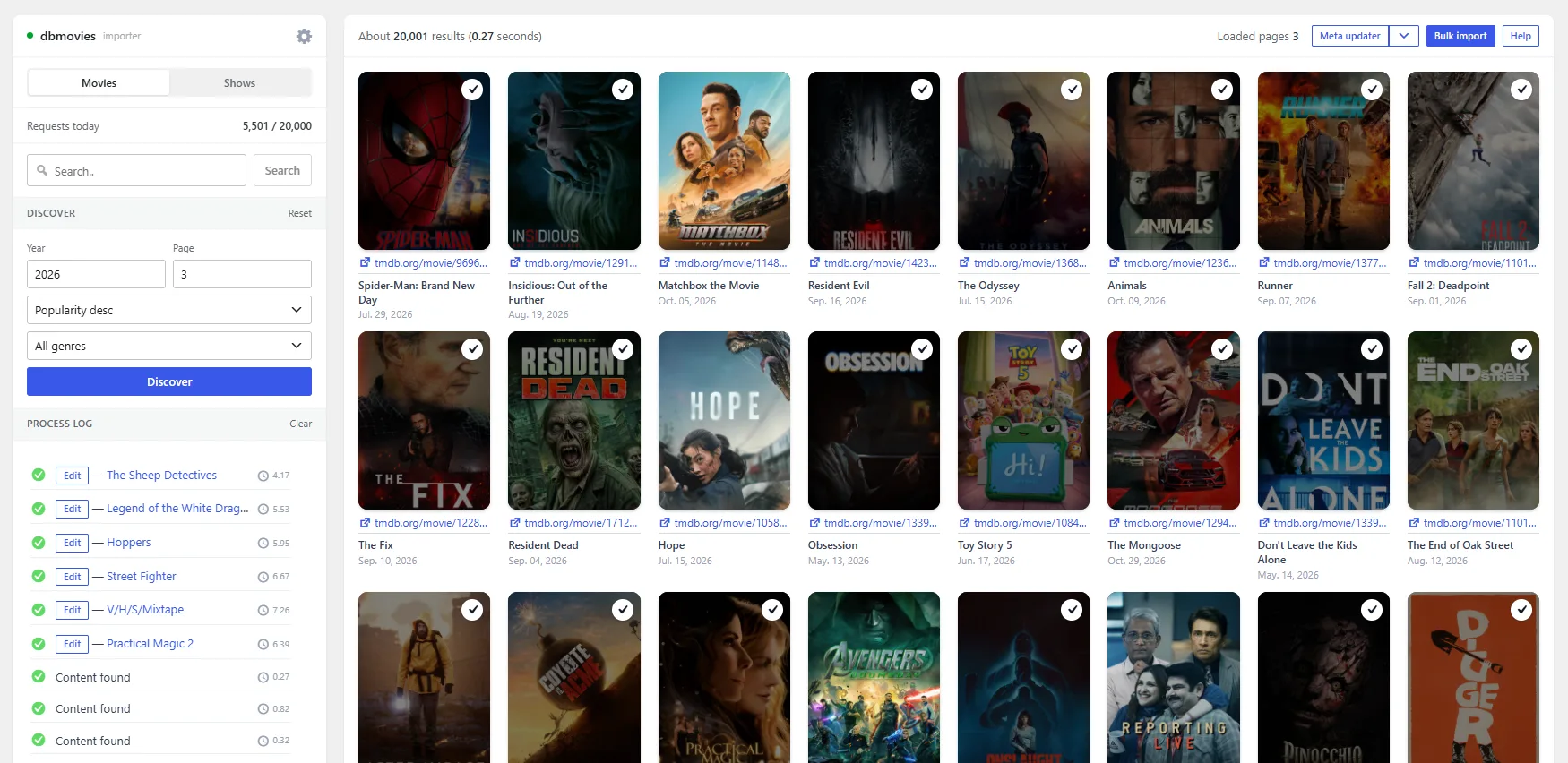
Open the Dbmovies menu. The screen has two columns.
The left column holds the tools:
- Movies and Shows: what you are looking for.
- Requests today: the requests your license used today, out of its daily limit. Click it to refresh it; Ctrl + click opens the license page.
- Search and Discover: two ways to find titles.
- Process log: a line for every import and every page of results.
- The gear: the importer settings.
The right column shows the results, with the number of results found and the pages loaded. At the top you also find Meta updater (and, in its arrow, the other tools), Bulk import and Help.
Finding titles
Search
Type the name of a movie or TV show, or part of it, and press Search or Enter. The button turns on once there are at least two characters. The × inside the box empties it.
Discover
Browse TMDb without a search term. It is the quickest way to fill a catalog from scratch.
- Year: optional. Leave it empty to browse every year.
- Page: the page of results to start from, 20 titles each.
- Order and genre: sort by popularity, rating, release date or title, and narrow to one genre.
Click Discover. As you scroll to the bottom, the next page loads on its own, up to the limit of the importer settings. Then Load more takes over. Reset puts the filters back to their defaults.
Importing a title
Hover over a poster and click Import. In a few seconds, the title is created on your site, its poster is marked as imported, and the process log shows it with a link and an Edit button.
- Titles already in your library are marked as Imported. They are not imported twice.
- Titles for adults show an NSFW badge.
- A title that failed gets a red outline. Click its Import button to try again.
What each import brings
| Data | Where it comes from | Setting that controls it |
|---|---|---|
| Title, synopsis, release date, runtime, tagline | TMDb | Language, and Titles and content for the title and content templates |
| Genres, release year, countries, tags | TMDb | Taxonomies and Import Limits (how many tags) |
| Cast, directors and creators | TMDb | Import Limits (how many of each) |
| Poster, backdrops and logos | TMDb | Import Images and Import Limits |
| Trailer | TMDb (YouTube) | — |
| TMDb rating and votes | TMDb | — |
| IMDb rating, votes and age rating | IMDb data, through the Doothemes server | — |
| Status and publish date | — | Movies, TVShows, Episodes and Publish with release date, in Initial settings |
All these settings are in Dbmovies › Settings › Data Importer. See Data importer, Import images, Import limits and Titles and content.
A few things to know:
- IMDb data uses one request of your daily limit for each movie or TV show. Episodes do not use IMDb requests. If the IMDb data cannot be loaded, for example because you reached your daily limit, the title is imported anyway without its IMDb rating, and the Meta Updater adds it later.
- Persons. A person that already exists on your site is reused, so a person page gathers all their titles. A movie saves the people credited as Director as its directors. A TV show saves its creators and the main cast of all its seasons, ordered by the number of episodes.
- Images. Depending on Import Images, they are uploaded to your media library or loaded from TMDb or your CDN.
- TV shows bring the list of their seasons. Their episodes are created by Automatic episodes, if it is on, or from the seasons manager. See TV Shows.
Bulk import
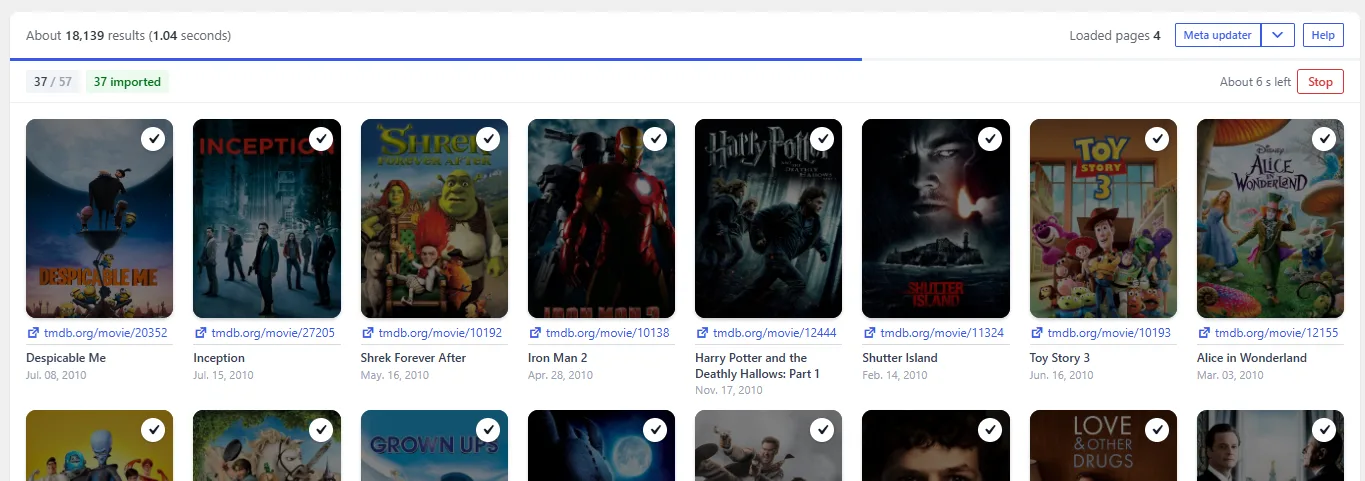
Bulk import, at the top of the results, imports every title on screen that is not in your library yet. Ctrl + Q does the same.
- Load the results you want, with Search or Discover.
- Click Bulk import. It tells you how many titles will be imported and asks you to confirm.
- A bar under the results shows how many are done, how many were imported and how many failed, and the time left.
- What is imported: only the titles on screen when you confirm. Pages that load afterwards need another bulk import.
- Parallel imports: several titles are imported at the same time (four by default, up to seven). Each one keeps a PHP process of your server busy, so on a small server use one or two.
- Stop: lets the imports that are running finish and does not start new ones.
- Automatic stop: after several failures in a row (five by default), the run stops by itself. When the source stops answering, the rest would only fail one by one and spend requests.
- Failed titles: they are not retried on their own. Click their Import button to try again.
Quick import
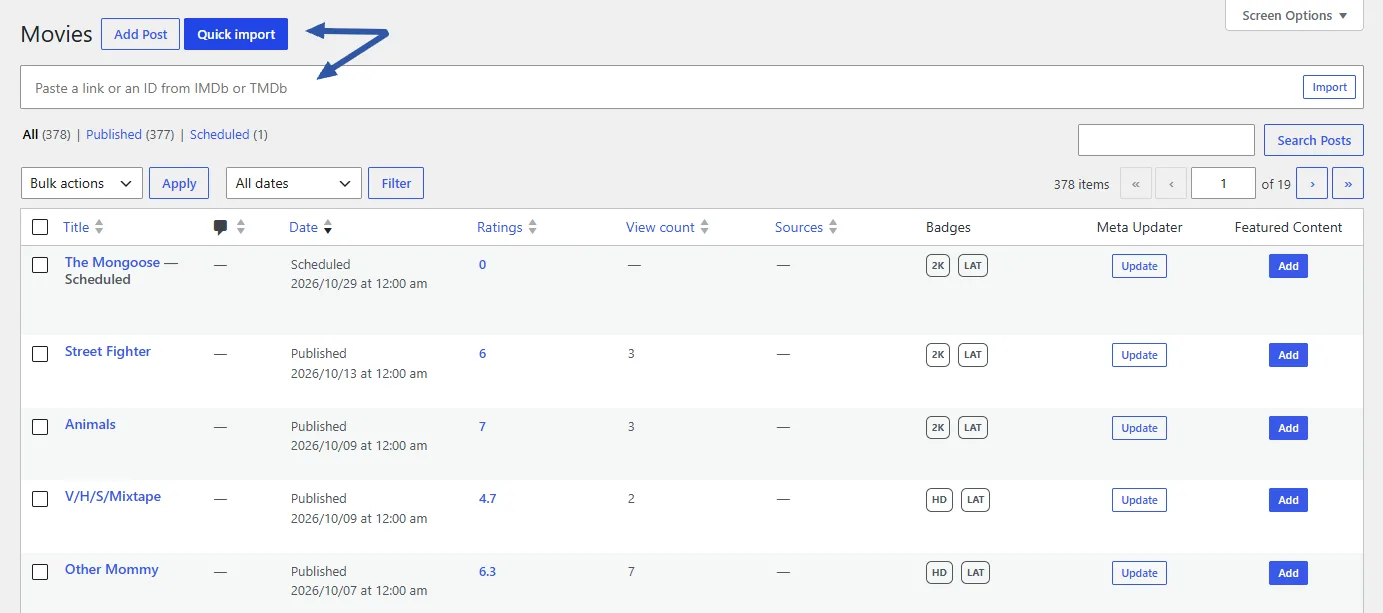
To import one title you already know, you do not need the importer:
- Go to the Movies or TV Shows list.
- Click Quick import, next to the add button at the top of the list.
- Paste a TMDb or IMDb link or ID, for example
https://www.themoviedb.org/movie/550ortt0137523, and click Import.
Dbmovies imports the title and opens it in the editor. If it is already on your site, it tells you and offers to edit it.
Importer tools
The arrow next to Meta updater lists the three tools of the importer. Each one opens in a side panel:
- Meta updater: refreshes the data of the titles you already imported. See Metaupdater.
- Automatic episodes: the queue that creates the episodes of your TV shows in the background. See TV Shows.
- Cleanup orphan persons: deletes the persons that no title uses anymore. See Cleanup orphaned persons.
While a tool works, you can close its panel and keep using the importer. A dot on the button tells you it is still running. Each tool also has its own link: add ?tool=metaupdater, ?tool=episoder or ?tool=orphan-cleanup to the address of the importer.
Importer settings
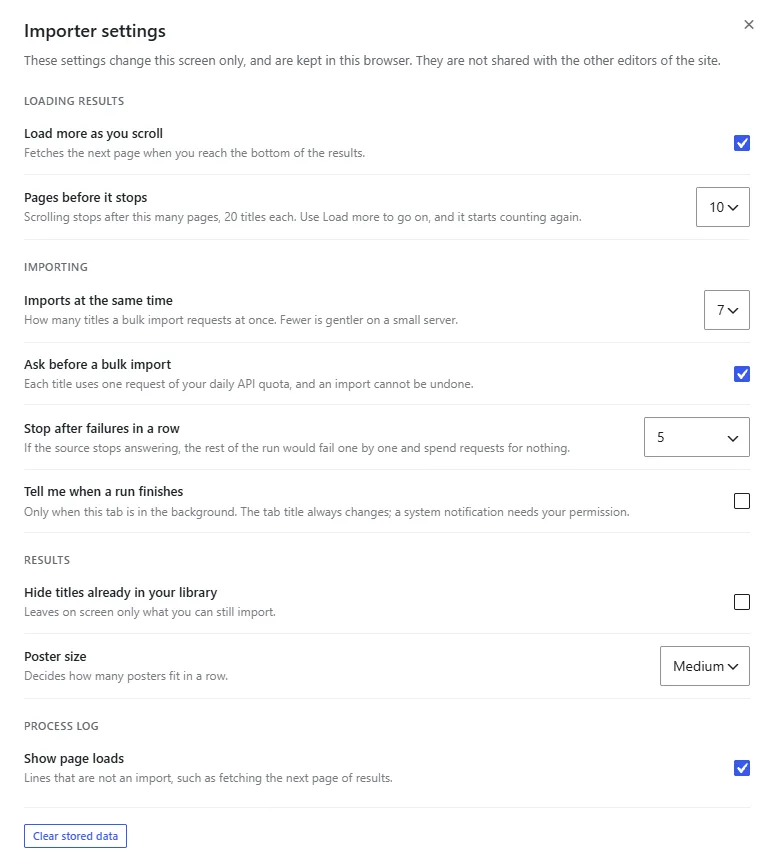
The gear at the top of the left column opens the settings of this screen. They are saved in your browser, so they change the importer for you and not for the other editors of your site.
- Loading results: whether the next page loads as you scroll, and how many pages before it stops.
- Importing: how many titles a bulk import requests at once, whether to confirm before it starts, after how many failures in a row it stops, and whether to notify you when a run finishes while the tab is in the background.
- Results: hide the titles already in your library, and the poster size.
- Process log: whether to show page loads, how many lines and for how many days to keep them, and what the time column shows.
Clear stored data puts everything back to its defaults and also empties the log.
Process log
Every import and every page of results leaves a line in the process log, newest first. Imported titles link to the title on your site and have an Edit button. The log is still there when you come back, and Clear empties it.
Help
Help, at the top of the results, opens a side panel with a summary of everything on this page.
Common problems
- The importer does not find anything. Check your TMDb API key in Initial settings. If your server cannot reach TMDb, turn on TMDb API proxy server in the same section.
- The importer is locked. Activate your license in Dbmovies › Updates.
- Titles are imported without IMDb rating. You probably reached your daily limit, or IMDb has no data for that title. The Meta Updater fills it in later. See License activation.
- A bulk import stops by itself. It stopped after several failures in a row. Wait a few minutes and run it again: the titles already imported are skipped.
- Your server slows down during a bulk import. Lower the number of parallel imports in the importer settings.