Dbmovies
Core modules
Core modules sets how many results the main lists of your site load and how long some of them stay in cache: live search, episodes, links, collections and related content. This page explains what each setting changes and where you see it.
Overview
Dbmovies › Settings › Core Modules controls the lists that Dbmovies builds for your theme and for your admin: how many results each one loads at a time and, for some, how long the results stay in cache.
It has five sections: Live search, Episodes list, Sources list, Collections list and Related content list.
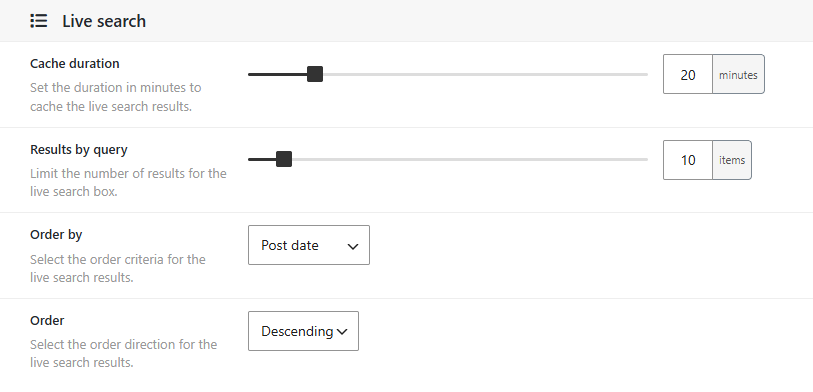
Live search
The search window of your theme, which opens from the header or with Ctrl+K: the results that appear while a visitor types.
| Setting | Default | What it does |
|---|---|---|
| Cache duration | 20 minutes | How long the results of a search stay in cache. 0 turns the cache off |
| Results by query | 10 | How many results the box shows (1 to 100) |
| Order by | Post date | Post date, Post title, Last modified or Relevance, which puts first the titles that best match the words typed |
| Order | Descending | Ascending or Descending. Not used with Relevance |
The full search page, the one that opens when the visitor presses Enter, has its own filters and order, and shows 18 results per page. Only Cache duration applies to it.
Episodes list
| Setting | Default | What it does |
|---|---|---|
| Results by query | 10 | How many episodes a season shows on the TV show page before the Load more button |
Sources list
| Setting | Default | What it does |
|---|---|---|
| Results by query | 10 | How many links the Links box of the editor shows per page, in movies and episodes |
This list is in your admin; it does not change what your visitors see.
Collections list
| Setting | Default | What it does |
|---|---|---|
| Results by query | 10 | How many titles the editor of a collection shows per page, in its box of titles |
| Titles per page | 12 | How many titles the collection page shows before the Load more button (1 to 50) |
See Collections.
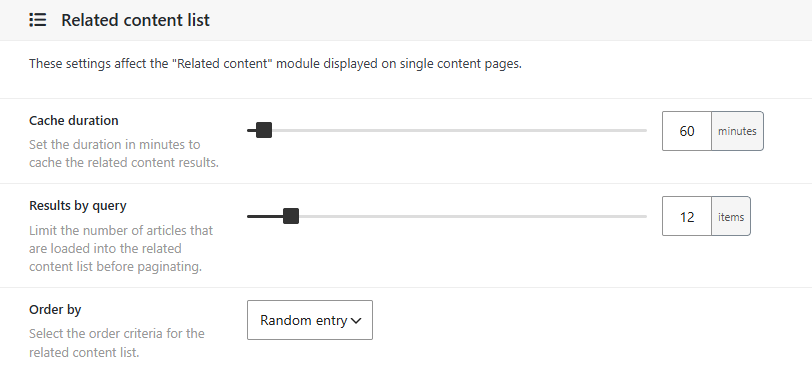
Related content list
The Related content block of movie and TV show pages.
| Setting | Default | What it does |
|---|---|---|
| Cache duration | 60 minutes | How long the related titles of a movie or TV show stay in cache. 0 turns the cache off |
| Results by query | 10 | How many related titles load at a time (1 to 50) |
Related titles are chosen by relevance:
- First, the titles that TMDb recommends or finds similar, and that you have on your site.
- Then, if there are not enough, titles of the same type that share genres with it.
Dbmovies prepares up to three pages of related titles for each movie or TV show.
About Cache duration
Cache duration keeps the results in the object cache of WordPress, so the same search or the same related titles are not calculated again on every visit. This only works with a persistent object cache, such as Redis or Memcached: without one, WordPress forgets the cache when the page finishes loading, and the setting has no effect.
- Longer: fewer database queries, but new titles take longer to appear in the results.
- Shorter, or 0: always fresh results, with more work for your database.
The defaults fit most sites. On a site with a lot of traffic and a persistent object cache, a longer duration lowers the load on your server.