Dbmovies
Cron Jobs
Dbmovies runs its maintenance tasks in the background with WP-Cron. This page lists every task and what it does, explains how to change its frequency, turn it off or run it right away, and how to set up a server cron job so tasks run on time.
Overview
Dbmovies keeps your site in shape with tasks that run in the background: it checks your licenses, syncs PayPal subscriptions, expires featured content, cleans up temporary data and more. These tasks use WP-Cron, the scheduler built into WordPress.
You manage them in Dbmovies › Tools › Cron jobs.
How WP-Cron works
WP-Cron does not run on a clock. It runs when someone visits your site: on each visit, WordPress checks which tasks are due and runs them.
- On a busy site, tasks run almost on time.
- On a site with few visits, tasks run late, or only when someone comes by.
That is why we recommend a server cron job that calls WordPress every minute, so tasks run on time whether you have visitors or not. See Setting up a server cron job.
The task list
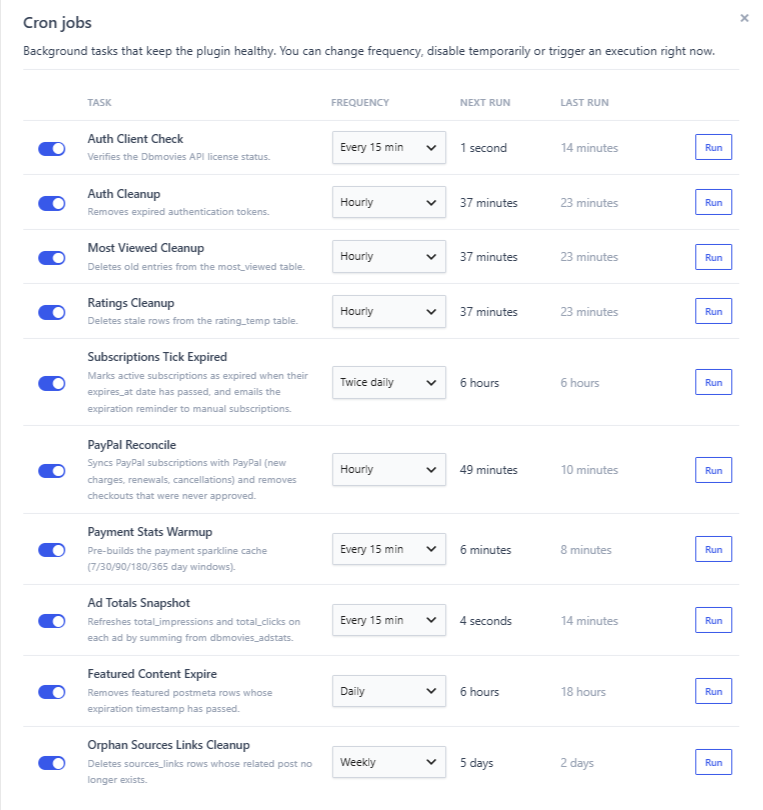
Each row shows:
- The switch: turns the task on or off.
- Task: its name and what it does.
- Frequency: how often it runs.
- Next run: the time left until it runs again. A disabled task shows a dash.
- Last run: how long ago it ran, or never.
- Run: runs the task right away.
Change how often a task runs
Choose a value in Frequency: Every 10 min, Every 15 min, Hourly, Twice daily, Daily or Weekly. The change is saved right away, and the task is scheduled again from that moment.
Turn a task off
Turn off its switch. The task stops running until you turn it on again, and its row is dimmed with the name struck through. Run still works on a disabled task, so you can run it by hand when you need it.
Run a task now
Click Run. The task runs at that moment and Last run is updated. Its schedule does not change. This is useful to see the effect of a task without waiting, for example to sync a PayPal subscription after a payment.
Tasks
| Task | Default frequency | What it does |
|---|---|---|
| Auth Client Check | Hourly | Checks the status of your licenses with the Doothemes server, so a renewal or an expiration shows up on its own. |
| Auth Cleanup | Hourly | Deletes expired sign-in and verification codes, and the accounts that were not verified within one hour of signing up. |
| Most Viewed Cleanup | Hourly | Deletes the view records older than one day, which feed the most viewed list. |
| Ratings Cleanup | Hourly | Deletes temporary rating data that is no longer needed. |
| Subscriptions Tick Expired | Twice daily | Marks subscriptions as expired when their end date passes, and emails a reminder to members whose manual subscription ends within 7 days. |
| PayPal Reconcile | Hourly | Syncs subscriptions with PayPal (new charges, renewals and cancellations) and removes checkouts that were never approved. |
| Payment Stats Warmup | Every 15 min | Prepares the payment charts, so Dbmovies › Payments opens fast. |
| Ad Totals Snapshot | Every 10 min | Updates the total impressions and clicks of each ad. |
| Featured Content Expire | Daily | Removes the featured mark from titles whose 30 days have passed. |
| Orphan Sources Links Cleanup | Weekly | Deletes links whose title no longer exists. |
The default frequencies fit most sites. If you change one, a shorter frequency keeps data fresher but adds work to your server.
Some tasks are better left on:
- Auth Client Check: without it, renewals, upgrades and expirations of your licenses are not updated. You can still check a license by hand with Check now in Dbmovies › Updates.
- PayPal Reconcile and Subscriptions Tick Expired, if you sell subscriptions: without them, renewals and cancellations made in PayPal do not reach your site, and expired subscriptions stay active.
Other background tasks
Automatic episodes and the automatic Meta Updater also run in the background with WP-Cron, but they are not part of this list. Turn them on and set how often they run in their own settings. See Metaupdater.
When you deactivate Dbmovies
Deactivating the plugin removes its tasks from WP-Cron. Your frequencies and the tasks you turned off are kept, and the tasks are scheduled again when you activate the plugin.
Setting up a server cron job
A server cron job calls wp-cron.php every minute, so tasks run on time. It takes two steps.
1. Turn off the visit-based WP-Cron
Open the wp-config.php file of your site and add this line before /* That's all, stop editing! */:
define('DISABLE_WP_CRON', true);From then on, visits no longer run tasks: the server cron job does.
2. Create the server cron job
In your hosting panel, open Cron Jobs (in cPanel, Plesk and most panels it has that name) and create a job that runs every minute with this command. Replace your-website.com with your domain:
wget -q -O - "https://your-website.com/wp-cron.php?doing_wp_cron" >/dev/null 2>&1If your server does not have wget, use curl:
curl -s "https://your-website.com/wp-cron.php?doing_wp_cron" >/dev/null 2>&1With SSH access, you can add it to the crontab as * * * * * followed by the command. If your server has WP-CLI, wp cron event run --due-now --path=/path/to/wordpress works too.
Do step 1 only after step 2 works. With DISABLE_WP_CRON and no server cron job, no task runs: licenses are not checked, subscriptions do not sync and the background tasks stop.
Check that tasks run on time
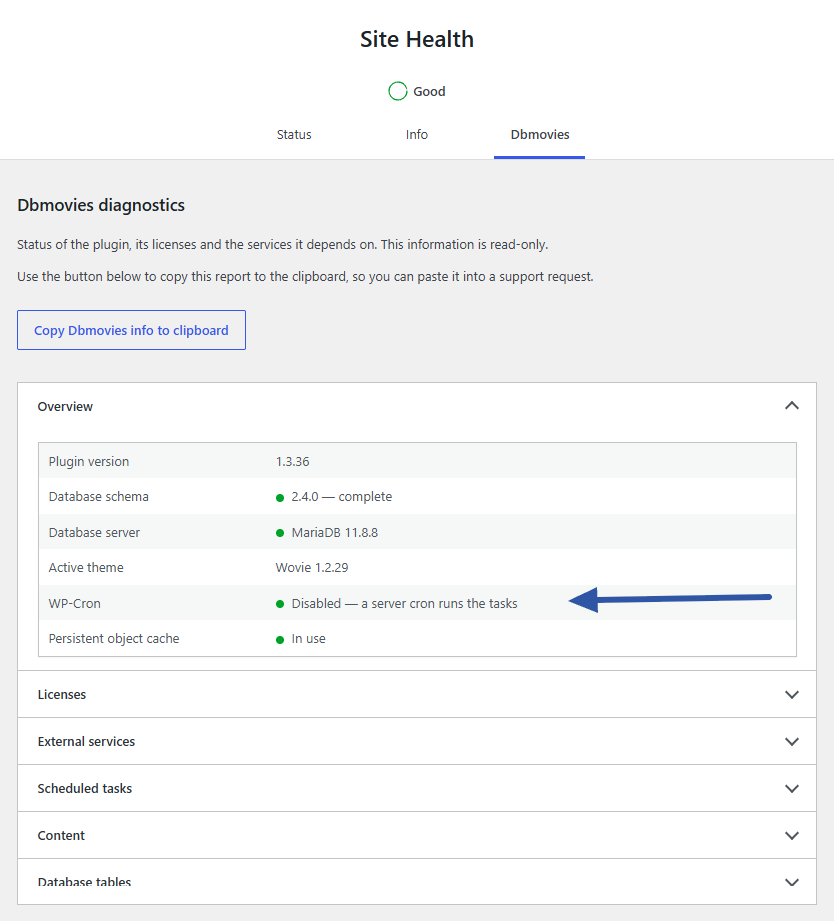
Go to Tools › Site Health and open the Dbmovies tab.
In Overview, the WP-Cron row shows:
- Disabled — a server cron runs the tasks: the recommended setup.
- Enabled — tasks run on page visits; a server cron is recommended: it works, but tasks can run late on a site with few visits.
- Tasks are … late: a task is more than 15 minutes overdue. If WP-Cron is disabled, your server cron job is not running: check it in your hosting panel. If it is enabled, your site does not get enough visits: set up a server cron job.
In Scheduled tasks, each task shows its frequency, when it runs next and when it ran last. A task marked Enabled but not scheduled is not running. Dbmovies schedules missing tasks again on the next page load, so reload the page; if the mark stays, open a support ticket.
Troubleshooting
- Last run says "never" or is far behind. WP-Cron is not running. Check the WP-Cron row in Site Health and set up a server cron job.
- The Automatic episodes queue does not move, and it warns that WP-Cron has not run for more than 5 minutes. Same cause: your site needs visits or a server cron job.