Dbmovies
Redis cache
Redis keeps the data of your site in memory between visits, so WordPress and Dbmovies do not ask the database for the same data again and again. This guide explains what Dbmovies keeps in the cache, how to set up Redis, and how to check it.
Overview
Redis keeps data in memory between visits, so WordPress and Dbmovies do not ask the database for the same data again and again. On a site with a large catalog and a lot of traffic, it is the change that lowers the load on your server the most.
WordPress calls this a persistent object cache. Without one, WordPress keeps its cache only while a page loads, and starts again on the next visit. Redis is the most common option. Memcached works too, with its own plugin.
Dbmovies works without Redis, and nothing changes in how you use it. Redis only makes it faster.
What Dbmovies keeps in the cache
| Data | How long | Refreshed |
|---|---|---|
| The archive lists of your theme: movies, TV shows, collections, and the pages of genres, years, countries and tags | 60 minutes | Right away when you publish, edit or delete a title |
| Live search and the search page | Cache duration of Live search, in Core modules. 20 minutes by default | Right away when you publish, edit or delete a title |
| Related titles | Cache duration of Related content, in Core modules. 60 minutes by default | When you edit the title |
| The data of each title that your theme loads | 5 minutes | When you edit the title |
| Person pages: credits and filmography | 6 to 12 hours | When you edit a title of that person |
Lists sorted by views or rating follow those numbers with a delay of up to 60 minutes. Before Dbmovies 1.3.37, new titles took up to 60 minutes to show in the archive lists with Redis: if that happens on your site, update Dbmovies.
WordPress also keeps its own data in Redis: settings, title data, terms and users. The temporary data of Dbmovies, such as the limits of the sign-in forms, moves from the database to memory.
What you need
- A Redis server. Many hosts include it: look for it in your hosting panel, or ask your host. On your own server (a VPS), install it. On Ubuntu or Debian:
sudo apt install redis-server. - The PHP extension PhpRedis (
redis), recommended. Without it, the plugin uses a PHP library that it includes, which is slower. - The Redis Object Cache plugin, free in the WordPress plugin directory.
Set it up
- In Plugins › Add New Plugin, search for Redis Object Cache, install it and activate it.
- If Redis is not on the same server with its default settings (
127.0.0.1, port6379, no password), add the connection towp-config.php, above the line/* That's all, stop editing! */. Your host gives you these values, and you only need the ones that change:
define('WP_REDIS_HOST', '127.0.0.1');
define('WP_REDIS_PORT', 6379);
define('WP_REDIS_PASSWORD', 'your-password');
define('WP_REDIS_DATABASE', 0);
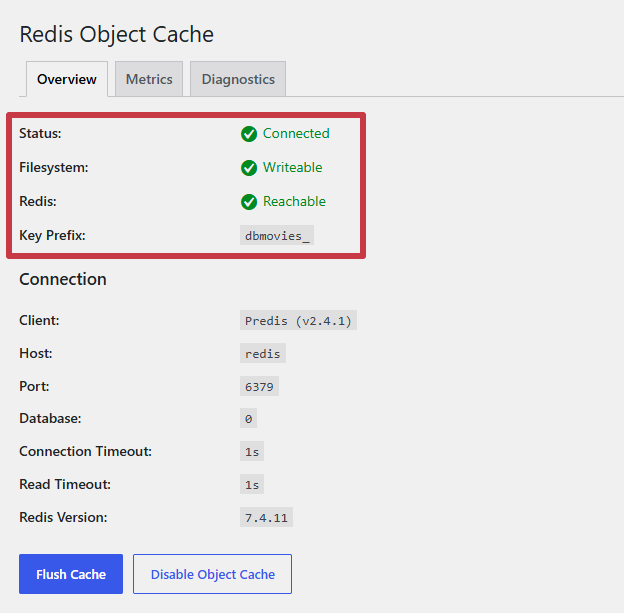
define('WP_REDIS_PREFIX', 'your-website');- Go to Settings › Redis and click Enable Object Cache. The status changes to Connected.
Several sites on one Redis server
If more than one site uses the same Redis server, give each site its own prefix with WP_REDIS_PREFIX, or its own database with WP_REDIS_DATABASE (from 0 to 15). Without that, the sites can mix their data, and one site may show titles or settings of another.
Memory
Give Redis a memory limit, and let it remove the oldest data when it is full. In redis.conf:
maxmemory 256mb
maxmemory-policy allkeys-lru
256 MB is a good start. A catalog of tens of thousands of titles may need more. On a managed host, your host usually sets this for you.
Check that it works
- In Settings › Redis, the status says Connected.
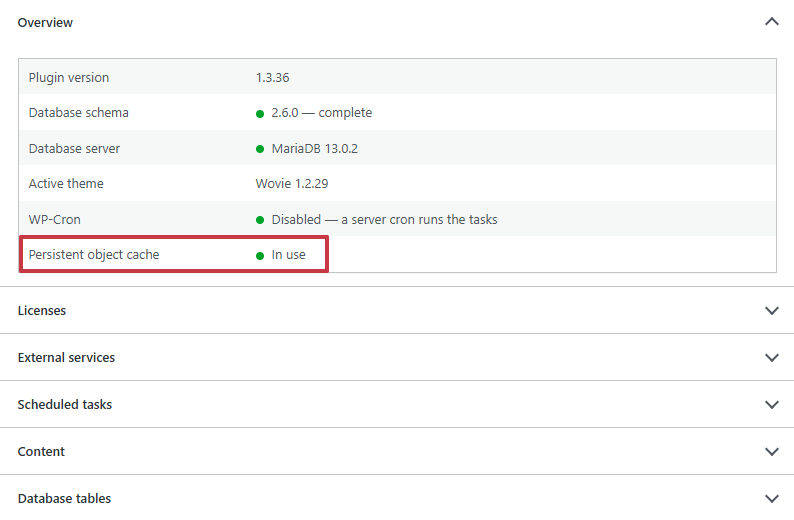
- In Tools › Site Health, open the Dbmovies tab: the Persistent object cache row says In use.
Clear the cache
Dbmovies refreshes its data in the cache when you change it, and the tools in Dbmovies › Tools clear what they need on their own. You rarely need to clear the cache by hand. Click Flush Cache in Settings › Redis when:
- you change the database directly, for example with phpMyAdmin;
- you migrate the site or move it to another domain;
- the site shows old data after an update.
Clearing the cache is safe. It fills again with the next visits, and the first ones are a little slower.
Redis and a page cache
They do different jobs, and they work well together:
- A page cache, from a cache plugin or a CDN such as Cloudflare, saves whole pages and serves them without running WordPress.
- Redis speeds up everything that still runs WordPress: the lists that load as visitors browse, the search, the admin and the pages of signed-in members.
On a Dbmovies site much of that is dynamic, so Redis helps even when you use a page cache.
Troubleshooting
| Problem | What to do |
|---|---|
| The status says Not connected | Redis is not running, or the connection data is wrong. Check the host, port and password with your host |
| A foreign object cache drop-in was found | Another plugin, often a cache plugin, has its own object cache. Use only one: turn off the object cache of the other plugin, then click Enable Object Cache |
| The site shows errors or old data after you enable it | Click Flush Cache. If the problem stays, click Disable Object Cache: the site goes back to working without Redis |