Dbmovies
Data importer
Data importer holds the settings of the importers: your TMDb API key, the proxy, the status and date of imported titles, the import language and which taxonomies are imported. This page explains each one and maps the rest of the Data Importer sections.
Overview
Dbmovies › Settings › Data Importer groups the settings of everything that brings data from TMDb and IMDb into your site. It has six sections:
| Section | What it sets |
|---|---|
| Initial settings | Your TMDb API key, the proxy, the status and date of imported titles, the language and the taxonomies. Explained on this page |
| Images | Which images are downloaded to your media library. See Import images |
| Limits | How much cast, crew and other data is imported per title. See Import limits |
| Titles | The title, address and content of imported titles. See Titles and content |
| Meta Updater | Updating your titles automatically. See Metaupdater |
| Automatic episodes | Importing new episodes of your TV shows on their own |
Settings are saved only with an active license. See License activation.
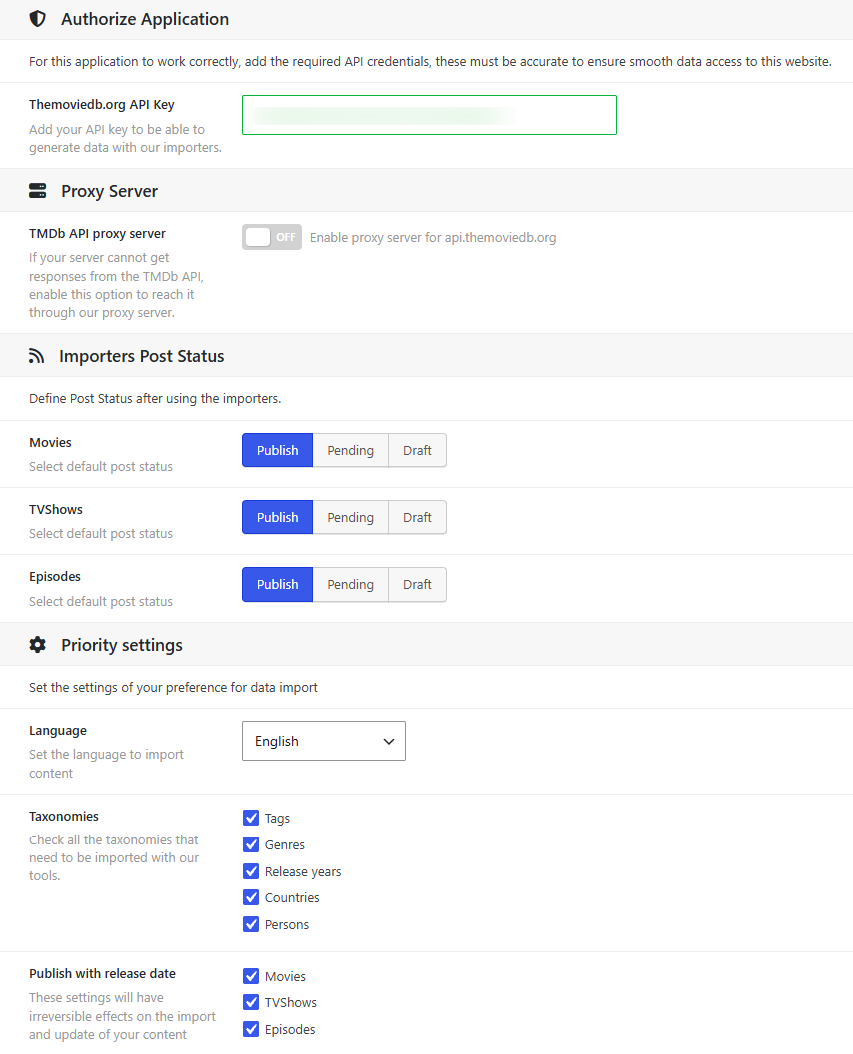
TMDb API key
Themoviedb.org API Key is the key the importers use to read TMDb. Without it, they cannot import anything.
Paste the API Key from your TMDb account (Settings › API). The field checks it with TMDb as you type: it turns green if the key works, and red with the reason if it does not. Importing with your own key does not use your daily requests. See Initial settings to get one.
TMDb API proxy server
Some servers cannot reach TMDb, because of their hosting provider or their country. Turn on TMDb API proxy server and Dbmovies requests TMDb through the Doothemes server instead.
- It needs an active license. Without one, Dbmovies connects to TMDb directly.
- It uses your daily requests, and adds a little time to each import.
- Use it only if you need it. If importing works without it, leave it off.
Tools › Site Health › Dbmovies shows whether the proxy is on.
Status of imported titles
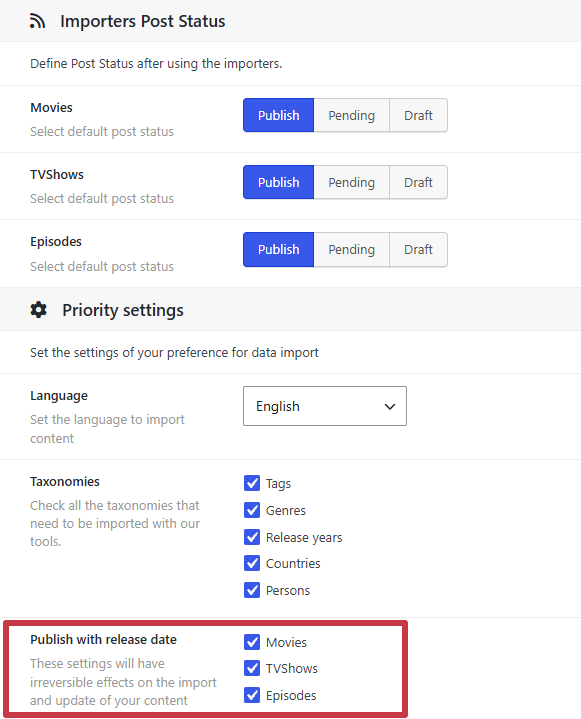
Importers Post Status sets the status that new titles get when you import them, one setting for each type: Movies, TVShows and Episodes.
| Status | What happens |
|---|---|
| Publish | The title is visible on your site right away. The default |
| Pending | The title waits for review in your admin |
| Draft | The title is saved as a draft |
It only applies to new imports. Updating a title keeps the status it has.
Language
Language is the language of the data you import from TMDb: titles, synopses, genres and the names of the cast. Posters, backdrops and logos are chosen in that language, or without text.
When TMDb has no translation of a title into your language, some data comes without it: the synopsis can arrive empty, and the title in its default form, usually English. You can complete it by hand in the editor, or add the translation on TMDb so the next update brings it.
Choose it before you start importing. Changing it later affects new imports and updates, but titles already imported keep their language until they are updated.
Taxonomies
Taxonomies chooses which taxonomies are filled in when you import a title:
- Tags: the keywords of TMDb.
- Genres.
- Release years.
- Countries.
- Persons: the cast and crew, with their person pages.
All are checked by default. If you uncheck one, imports skip it.
Updates add the new terms that TMDb brings, but never remove the ones a title already has. This keeps the terms you added by hand. Persons are the exception: the cast and crew always follow the credits of the title.
Publish with release date
Publish with release date uses the release date of each title as its publish date, for the types you check: Movies, TVShows and Episodes. All are checked by default.
- Your lists follow the release dates. On your site, titles sorted by date appear in the order they were released, not in the order you imported them.
- Future dates are scheduled. A title whose release date is in the future is saved as Scheduled, and WordPress publishes it on its release date. If you want upcoming titles to be visible right away, uncheck its type before importing.
- Updates apply it too. When a title is updated, its date changes to the release date if TMDb changed it. If the option is off, updating keeps the date the title has.
Decide this setting before you import. Changing it later does not change the dates of the titles you already have: only new imports, and titles that are updated while it is on, get the release date.