Dbmovies
Updates
Dbmovies › Updates is the license and update center for every Doothemes product on your site: Dbmovies and your Doothemes theme. This page explains the product list, license statuses, daily limits and how they are shared, how updates arrive, and local sites.
Overview
Dbmovies › Updates is the center for the licenses and updates of every Doothemes product installed on your site:
- the Dbmovies plugin;
- your Doothemes theme, such as Wovie;
- any Doothemes add-on.
Each product has its own row, its own license key and its own status. Dbmovies is the only part of your site that talks to the Doothemes server, so your theme and add-ons are managed from here too.
To activate, move or remove a license, see License activation.
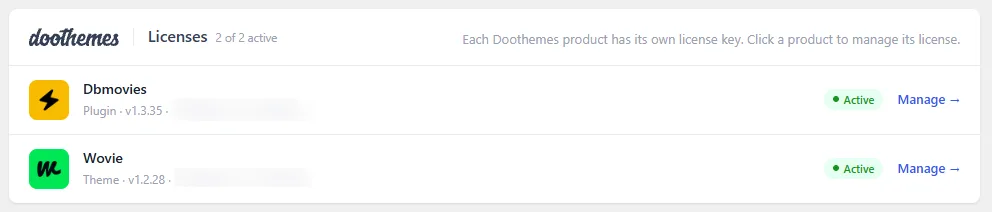
The product list
Each row shows the icon and name of the product, its type (plugin or theme), the installed version, the license key partly hidden, and its status. The header shows how many of your products are active. Click a row, or Manage, to open its panel.
Statuses
- Active: the license is valid on this site. The product receives updates and its licensed features are unlocked.
- Inactive: no license is connected, or it was deactivated or expired. Dbmovies keeps your content working, but importing, the background tasks, IMDb data, updates and saving the plugin settings need an active license.
Keeping licenses in sync
Dbmovies checks your active licenses with the server every hour, so a renewal, an upgrade or an expiration shows up on its own. You can change how often it checks in Dbmovies › Tools › Cron Jobs (task Auth Client Check).
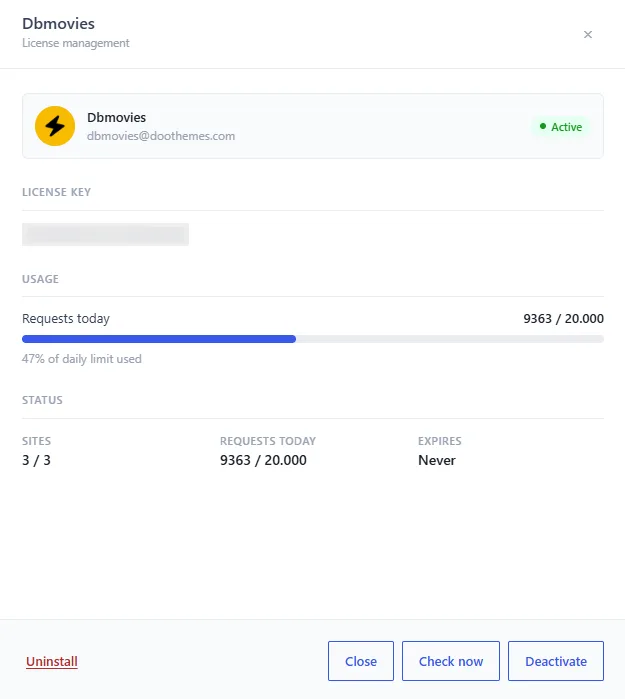
To check a license right away, open its panel and click Check now. The panel shows:
- Sites: the activations in use, out of the ones your plan allows.
- Requests today: the requests used today, out of your daily limit.
- Expires: when the license ends, or Never for a lifetime license.
If the server cannot be reached during a check, nothing changes on your site: a temporary problem never deactivates your license.
Daily limits
Each license has two separate limits:
- Sites: how many sites the license can be active on at the same time. It belongs to each license and is never shared.
- Requests today: how many requests the license can make to the Doothemes server per day. It resets every day.
These count toward Requests today:
- IMDb data: one request each time a movie or TV show gets its IMDb ratings, on import or when the Meta Updater refreshes it. Episodes do not use IMDb requests.
- License checks: the hourly check and each Check now.
- The TMDb proxy, if you turn it on.
Requests to TMDb with your own API key do not count. When a license reaches its limit, the features that use the server stop making requests until the next day. Nothing breaks, and the data you already have stays in place.
Sharing requests across licenses
When you have more than one active license on your site, for example Dbmovies and Wovie, their daily requests back each other up for IMDb data: when one license reaches its limit, the next one takes over.
- Only active licenses take part. Activate your theme license to add its requests.
- Each license keeps its own count. When one runs out, the next one is used.
- The Sites limit is never shared.
How updates arrive
With an active license, Dbmovies and your Doothemes theme update like any other plugin or theme:
- New versions appear in Dashboard › Updates and in the plugins or themes list.
- Click View details to read what changed before you update.
- You can also turn on automatic updates for them, as for any plugin or theme.
To update by hand, download the latest version from your Doothemes account and upload it. See Installation.
Local sites
Local sites do not use an activation. This applies to localhost, to domains that end in .local, .test or .localhost, and to private network addresses. You can activate your license on your local copy as many times as you need.
A staging or test site on a public domain, such as staging.your-website.com, uses an activation like any other site.