Dbmovies
Dbmovies
Dbmovies turns WordPress into a complete movie and TV website. This page explains what it does, how its pieces fit together and how this documentation is organized.
Welcome
Thank you for choosing Dbmovies. This documentation covers everything you need to run a movie and TV website with it, from installing the plugin and activating your license to importing your catalog, managing links and charging for memberships. It is written for site owners, content managers and the developers who build on top of Dbmovies.
What is Dbmovies?
Dbmovies is a premium WordPress plugin that turns your site into a complete movie and TV website. It imports the information of each title from The Movie Database (TMDb) and IMDb (synopsis, posters, backdrops, genres, cast and crew, trailers and ratings) and creates pages that are ready to publish in seconds.
Instead of creating every movie, TV show and episode by hand, Dbmovies handles the whole workflow. It registers the content structure, imports the data, creates the episodes of each TV show in the background and keeps everything up to date. On top of that, it gives you the tools to manage video links, user accounts, memberships and ads from the WordPress admin.
Dbmovies manages the content, and your theme shows it to your visitors. The Wovie theme is built for Dbmovies and uses all its features.
Note: Dbmovies does not include, host or stream any video. You add your own video sources, and you are responsible for having the rights to publish them.
How it works
- Install and activate. Install the plugin, activate your license in Dbmovies › Updates and add your free TMDb API key. See Installation and License activation.
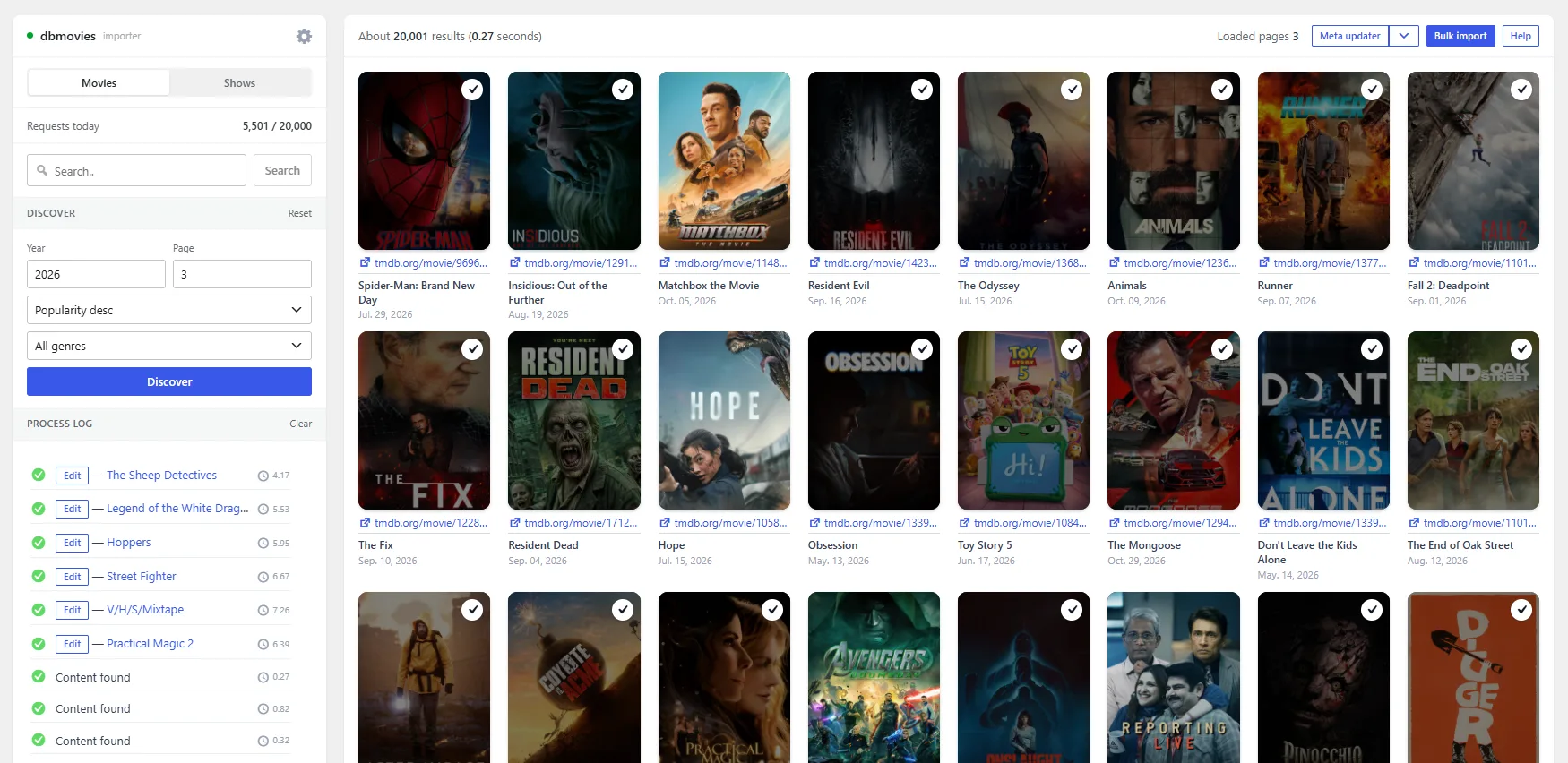
- Import your catalog. Search TMDb by title, or discover titles by year, genre and popularity. Import them one by one or a whole page of results at a time, or paste a TMDb or IMDb link with Quick import.
- Let the episodes arrive. With Automatic episodes turned on, every TV show you import queues its aired episodes, which are created in the background, one season at a time.
- Add the video links. Add links by hand, import thousands from an Excel or CSV file, or generate them for every title from your provider's URL pattern with Auto-Embed.
- Open your site to your audience. Visitors create accounts, save titles to My List, rate them, request new ones and subscribe to premium memberships.
- Keep it fresh. The Meta Updater refreshes ratings, cast and metadata on a schedule, and the link health checks tell you which links stopped working.
Key features
Content engine
- Content types for movies, TV shows, episodes and collections, with genres, release years, countries and persons (cast and crew).
- One-click importers for movies and TV shows from TMDb, with IMDb ratings.
- Bulk import of a whole page of results, Quick import with a TMDb or IMDb link or ID, and title requests from your users.
- Automatic episodes: the episodes of each TV show are created in the background, season by season, with limits you control.
- The Meta Updater keeps ratings, cast and metadata up to date on its own.
Links
- One screen to manage every streaming and download link, with its language, quality, status, premium access and play count.
- Import links from Excel or CSV files, up to 5,000 rows per file, with a full preview before anything is saved.
- Auto-Embed: embed links for every movie and episode, built from each title's IDs.
- Link health checks for MEGA, 1fichier, MediaFire, MegaUp and YouTube links.
Audience
- User accounts with sign-up, Google sign-in, email verification and active session management.
- My List, user ratings, comments with custom emojis, and title requests.
- A view counter and featured content to highlight what matters.
Monetization
- Premium memberships with plans, taxes and automatic recurring billing through PayPal, plus manual activation for other payment methods.
- A Payments screen with every charge, refund and renewal.
- Premium-only links for members.
- An Ad Manager for your own ad slots and campaigns.
Administration and security
- A license hub that manages the licenses and updates of Dbmovies and your Doothemes themes.
- A firewall with an IP blacklist and email checks that reject disposable addresses.
- Maintenance tools: Sources domain exchanger, Cleanup orphaned persons, Cron Jobs and the Restorer.
- Background tasks with time limits, WordPress Site Health checks, and a REST API for integrations.
Content structure
Dbmovies registers its own content types and taxonomies, so your catalog stays separate from your regular posts and pages.
| Content | Type | What it holds |
|---|---|---|
| Movies | Post type | Each movie, with its metadata, images and links |
| TV Shows | Post type | Each TV show, with its seasons and metadata |
| Episodes | Post type | Each episode, linked to its TV show, with its links |
| Collections | Post type | Curated groups of titles |
| Genres | Taxonomy | Genres from TMDb |
| Releases | Taxonomy | Release years |
| Countries | Taxonomy | Production countries |
| Persons | Taxonomy | Cast and crew |
| Tags | Taxonomy | WordPress tags, on movies and TV shows |
What you need
- WordPress 7.0 or higher and PHP 8.1 or higher.
- A free TMDb API key.
- An active Dbmovies license, for importing, background tasks and updates.
- Recommended: the Wovie theme, a server cron job that runs every minute, and an object cache such as Redis on large sites.
See Requirements for the full list.
Who is Dbmovies for?
- Site owners who want to launch a movie and TV website quickly, without writing code.
- Content managers who need to import, update and organize thousands of titles and links.
- Developers who build themes or add-ons on top of the Dbmovies content types, hooks and REST API.
How this documentation is organized
- Getting started: Requirements, Installation, License activation and Initial settings.
- Post types and taxonomies: what each content type stores and how it is used.
- Modules: the importers, link sources, payments, subscriptions, ads, user requests and ratings, the view counter, featured content and updates.
- Tools: the Meta Updater, link health checks and the maintenance tools.
- Settings: every section of the Dbmovies settings, from required pages to Auto-Embed and the firewall.
- Guides: step-by-step guides such as Redis cache and deploying a CDN server.
- Releases: what changed in each version.
Getting help
- Support tickets: customers with an active license can open a ticket from their account.
- Telegram group: join the Doothemes community on Telegram.