Dbmovies
View counter
The view counter counts how many times your movies, TV shows, episodes and collections are viewed, and keeps a 24-hour log for trending lists. This page explains what counts as a view, where views appear, and how page caching affects them.
Overview
Dbmovies counts the views of your titles, so you and your visitors can see what is popular:
- the total views of each movie, TV show, collection and episode;
- the trending titles of the last 24 hours, for lists such as "Most viewed".
It works on its own: there is nothing to set up.
What counts as a view
| Content | When a view is counted |
|---|---|
| Movies, TV shows and collections | Each time their page is loaded |
| Episodes | Each time a visitor opens the links of the episode |
Each page load counts, reloads included.
Links have their own counter: the Requests column of Dbmovies › Links counts how many times each link was opened. See Link sources.
Trending in the last 24 hours
Each view of a movie or TV show is also written to a short log. Your theme uses it to show the most viewed titles of the last 24 hours, overall or only movies or TV shows. In Wovie, it feeds the "Most viewed" rankings of the home page.
A scheduled task cleans the log every hour and keeps only the last 24 hours, so it stays small even on busy sites. You can see it in Dbmovies › Tools › Cron Jobs.
Where views appear
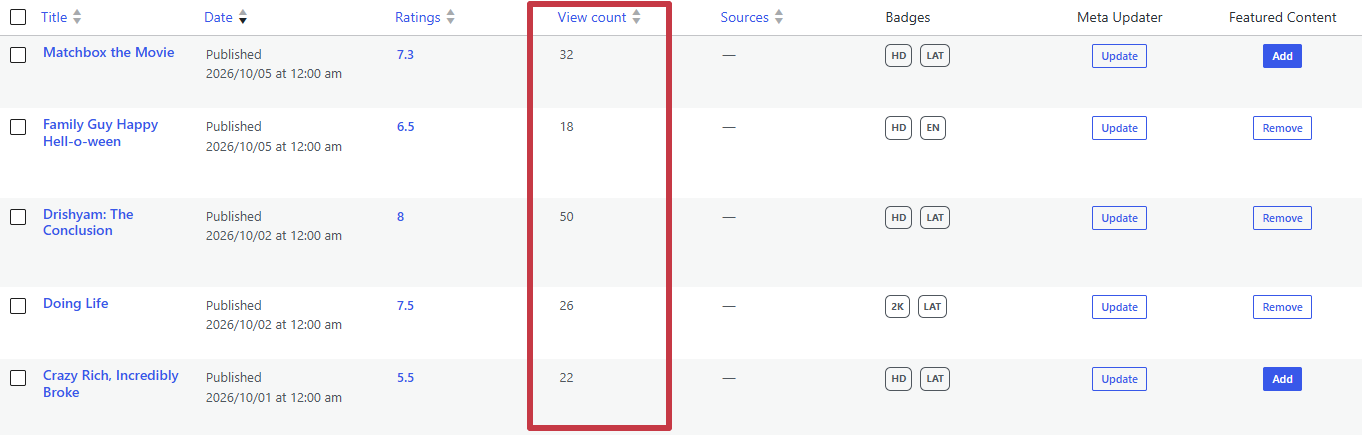
- In the admin: the View count column of the Movies, TV Shows, Episodes and Collections lists. You can sort by it. See Movies.
- On your site: your theme can show the views of each title and use them to sort lists.
Page caching
If your site uses full-page caching, such as WP Rocket, LiteSpeed Cache or Cloudflare APO, pages served from the cache do not reach WordPress, so those visits are not counted. Totals then show the visits that reached your server, not all of them.
Episode views are not affected, because they are counted when the visitor opens the links, which is never served from the page cache.