Dbmovies
Metaupdater
The Meta Updater keeps the data of your imported titles up to date: ratings, cast, images and details from TMDb and IMDb. This page explains how to update one title, all your catalog at once or automatically in the background, and what each setting does.
Overview
TMDb and IMDb data changes over time: ratings and votes move, new cast is confirmed, posters and backdrops are replaced. The Meta Updater refreshes the titles you already imported with the latest data, without importing them again.
There are three ways to use it:
- One title, with its Update button.
- All your catalog at once, from the Meta updater panel of the importer.
- Automatically, in the background, with Automatize.
What is updated
Each update reads the title again from TMDb and IMDb and refreshes:
- the details: original title, tagline, release date, runtime, status and so on;
- the TMDb and IMDb ratings and votes, and with them the rating of your site;
- the cast and crew;
- the genres, release year, countries and tags;
- the poster, backdrops and logos (the featured image is only uploaded if the title has none);
- the related titles that TMDb recommends;
- whether the title is already released (the Released Content switch of the Advanced box).
The Metadata box is replaced with the fresh data, so changes you made there by hand are lost.
What stays as it is:
- your links;
- your visitors' votes and views;
- the rest of the Advanced box: badges, featured content, collections and platforms.
If the IMDb data cannot be loaded, for example because you reached your daily limit, the title keeps its current IMDb values.
Title, slug and content
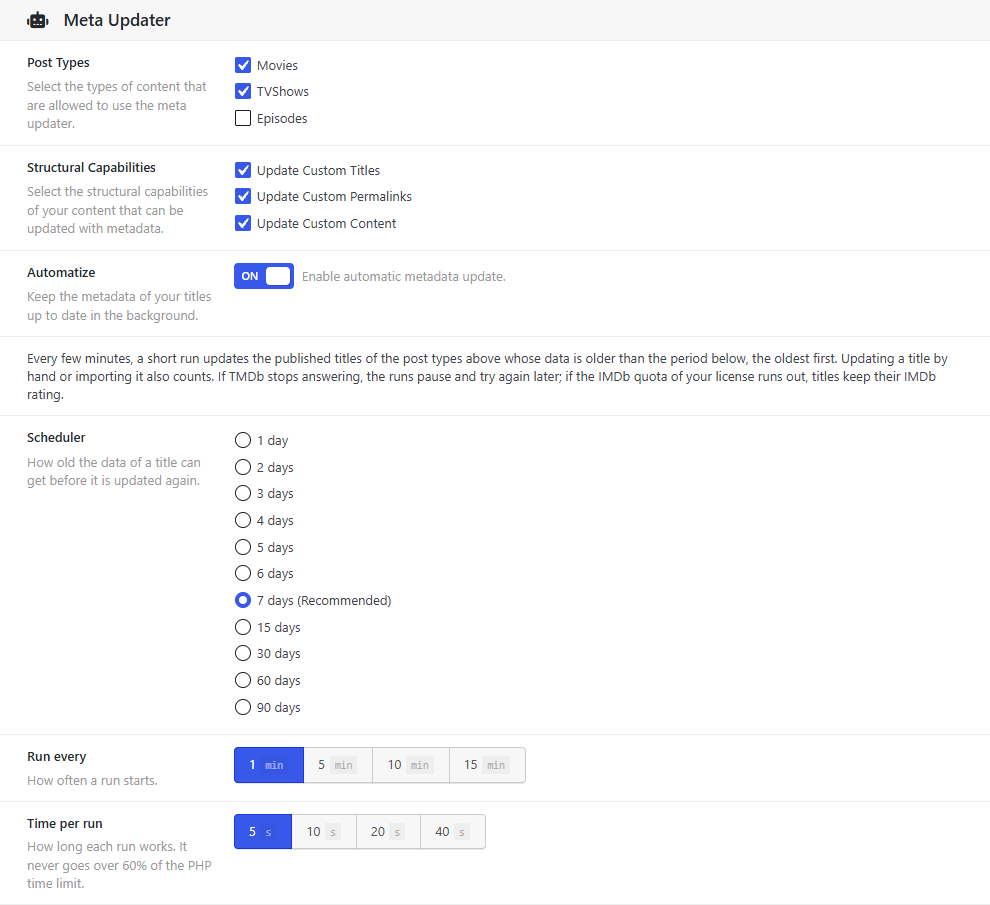
Structural Capabilities, in the settings, decides whether an update also rewrites these fields with your import templates:
- Update Custom Titles: the title.
- Update Custom Permalinks: the slug, the last part of the address.
- Update Custom Content: the synopsis in the editor.
All three are checked by default.
With these options checked, every update overwrites the title, slug and content of the title. Changes you made by hand are lost, and if TMDb changes the name of a title, its address changes too, so links to the old address stop working. On a published site, we recommend unchecking Update Custom Permalinks, and also the others if you edit titles or synopses by hand.
Updating one title
In the Movies, TV Shows or TV Episodes list, click Update in the Meta Updater column. The title is refreshed right away. The editor of each title also has an update button at the top.
Updating all your catalog
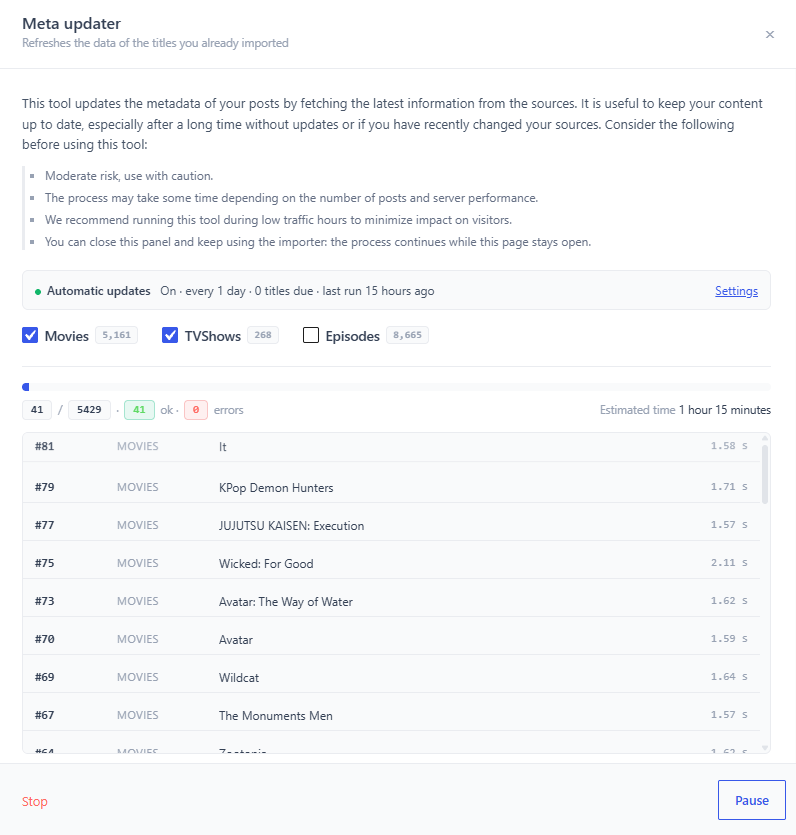
- Open the importer (the Dbmovies menu).
- Click Meta updater at the top of the results. Its panel opens.
- Choose the content types to update: movies, TV shows and episodes.
- Click Start and confirm.
The panel shows the progress, how many titles were updated and how many had errors, and the time left. You can Pause and Resume, or Stop.
You can close the panel and keep using the importer: the update goes on while the page stays open. If you leave the page, the panel offers to resume the next time you open it.
It goes through all your published titles of those types, so on a large catalog it takes a while and uses requests of your daily limit. Run it at quiet hours.
Updating automatically
Turn on Automatize and the Meta Updater keeps your catalog fresh on its own. Every few minutes, a short run updates the published titles whose data is older than the period you choose, the oldest first.
Set it up in Dbmovies › Settings › Data Importer › Meta Updater:
| Setting | Values | What it does |
|---|---|---|
| Post Types | Movies, TV Shows, Episodes | The content types it updates (all three by default) |
| Automatize | On / Off | Turns on the automatic updates |
| Scheduler | 1 to 7 days, 15, 30, 60 or 90 days | How old the data of a title can get before it is updated again (7 days by default) |
| Run every | 1, 5, 10 or 15 minutes | How often a run starts (5 minutes by default) |
| Time per run | 5, 10, 20 or 40 seconds | How long each run works (20 seconds by default). It never goes over 60% of the PHP time limit |
- What counts as updated. Updating a title by hand or importing it counts too, so recently imported titles are not updated again until their period ends.
- Titles that cannot be updated. A title that TMDb no longer has, or that has no TMDb ID, is skipped until its next period, instead of being retried in every run.
Pauses
- TMDb. If TMDb limits your requests or stops answering, the runs pause and try again later. The titles stay pending for the next run.
- IMDb. If your license runs out of daily requests, titles are still updated with their current IMDb values, and the runs pause for one hour.
Status
The Meta updater panel of the importer shows the state of the automatic updates:
- whether they are on;
- the period;
- how many titles are due;
- when the last run was.
If they are paused, it shows why and when they resume.
What it needs
- An active license. The background tasks do not run without one.
- Scheduled tasks that run on time. WordPress runs them when someone visits your site, so on a site with few visits, set up a server cron job that calls
wp-cron.phpevery minute. A run every minute needs one. See Cron Jobs.
Requests and your daily limit
Each movie or TV show that is updated uses one request of your daily limit for its IMDb data. Episodes do not use IMDb requests. A short period with a large catalog means many updates per day, so choose a period that fits your plan. See License activation.