Dbmovies
Link sources
Links are the video sources of your movies and episodes: streaming embeds, downloads and MP4 files. This page explains the Links screen, link types and statuses, premium links, link health, and the three ways to add links, including importing thousands from a spreadsheet.
Overview
A link is a video source of a movie or an episode: a streaming player, a download or a direct MP4 file. Your theme shows the published links of each title to your visitors.
Dbmovies › Links is the central place for every link of your site. From there you search, filter, add, edit, verify and delete links without opening each title.
There are three ways to add links:
- One by one, from Dbmovies › Links or from the Sources box of each movie or episode.
- Many at once, importing an Excel or CSV file with up to 5,000 rows.
- Automatically, with Auto-Embed, which builds embed links for every title from your provider's URL pattern.
The Links screen
The list shows every link with:
| Column | What it shows |
|---|---|
| Server / Hash | The host name (MEGA, YouTube…) and the unique hash of the link |
| Lang / Quality | The language, with its flag, and the quality |
| Type | Embed Link, Download or MP4 Link |
| Status | Published, Pending, Processing, Refused or Revoked |
| Post | The movie or episode it belongs to |
| Health | A score from 0 to 100 that tells whether the link still works |
| Premium | Whether only members can use it |
| Requests | How many times visitors opened it |
| User | Who added it |
| Created | When it was added |
Above the list, search by URL or title, and filter by status, type, post type (movies or episodes) and health. Tools opens the maintenance tools, and Add link the form for a new link.
For security, the list only shows the server name, never the full URL. The real URL appears only in the edit panel, so you can share screenshots of this page without exposing your sources.
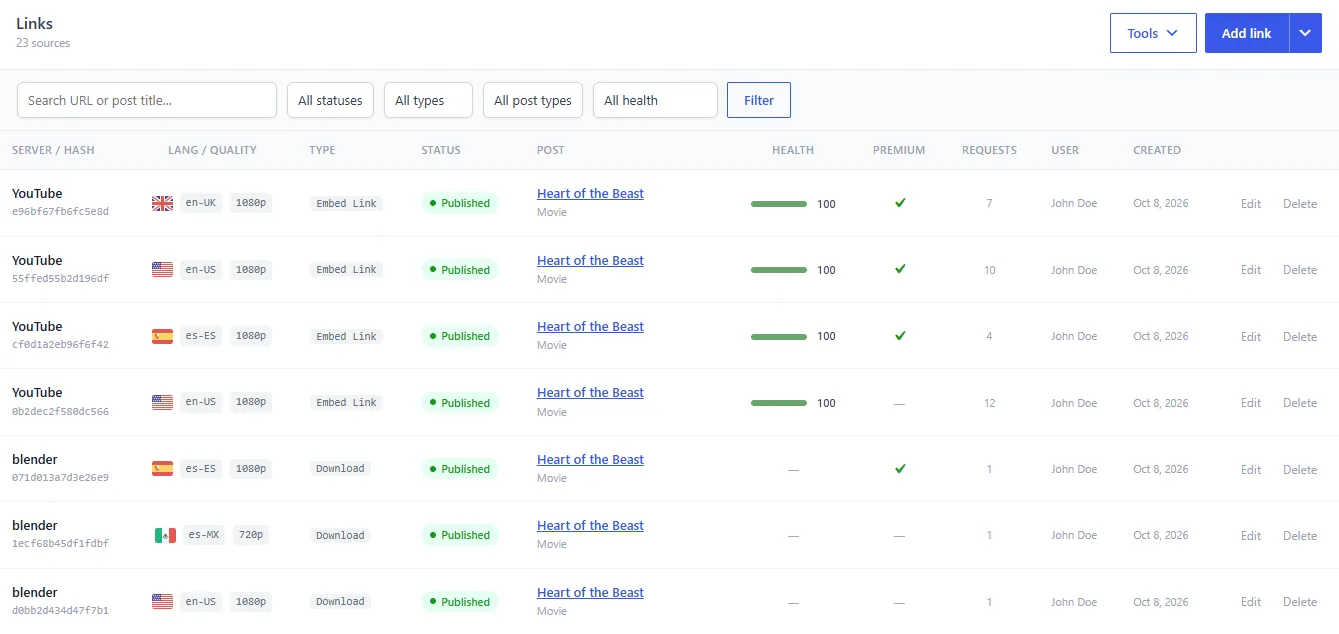
Link types
The type tells the player how to handle the link:
- Embed Link: an external player loaded in a frame, from hosts like YouTube or other streaming services.
- Download: a direct link to a file on a host like MEGA, 1fichier or MediaFire. Only downloads have File size and Password.
- MP4 Link: a direct video file, played in the HTML5 player.
Link statuses
The status controls whether visitors see the link:
- Published: live and visible.
- Pending: waiting for your review, not visible. The Links badge in the admin toolbar counts them.
- Processing: being worked on, for example while you replace the file.
- Refused: rejected and kept for reference, not visible.
- Revoked: disabled, for example because the host took it down. Not visible.
To stop showing a link without deleting it, set it to Refused or Revoked.
Premium links
Turn on Premium to reserve a link for members with an active subscription. Visitors without one cannot open it. See Subscriptions.
Link health
The Health score (0 to 100) tells whether a link still works. Dbmovies checks it directly with the host. It supports MEGA, 1fichier, MediaFire, MegaUp and YouTube; links from other hosts stay at 0.
| Score | Meaning |
|---|---|
| Healthy (80–100) | Confirmed available |
| Degraded (50–79) | Uncertain: timeout, blocked or unclear answer |
| Broken (1–49) | Confirmed deleted or removed |
| Not checked (0) | Never checked, or a host that is not supported |
The score updates every time you publish or edit a link. To check many links at once, use Tools › Analyze link health. See Analyze link health. Then use the Health filter to find the broken ones.
Adding a link
- Click Add link.
- Search for the movie or episode the link belongs to.
- Paste the URL.
- Choose the Type, Status, Language and Quality. For downloads, you can also set the File size and a Password. If you leave the file size empty, Dbmovies fills it in from the host when it can.
- Turn on Premium if only members can use it.
- Save.
Dbmovies remembers your last type, language and quality, which speeds up adding links in a row. A URL that is already registered is rejected.
You can also add links from the Sources box of each title. See Movies and Episodes.
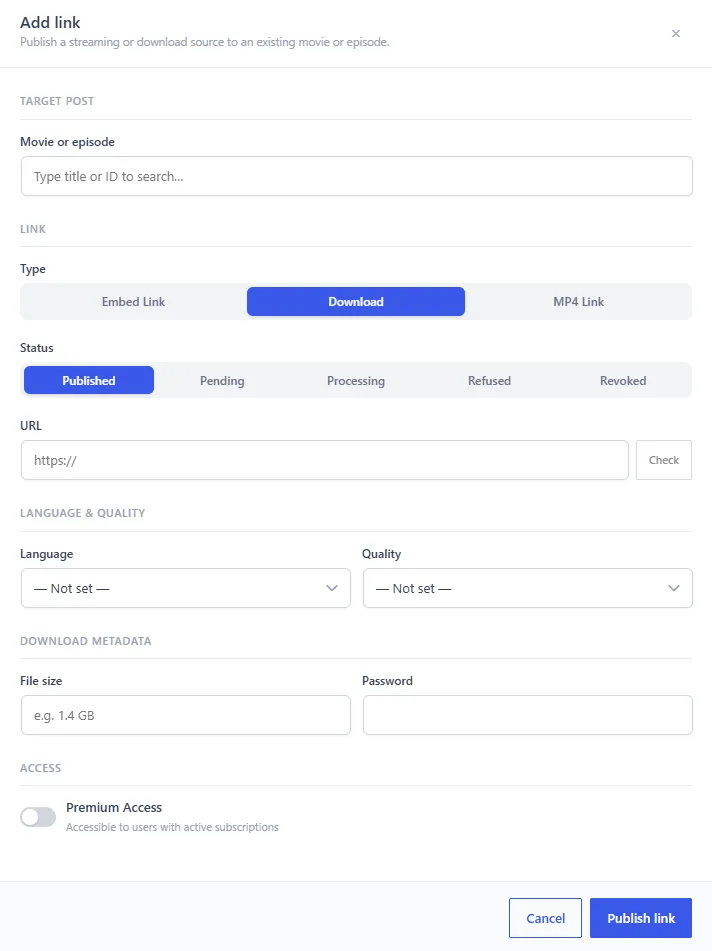
Editing a link
Click the row of a link, or Edit, to open its panel. There you see the real URL, its host, who added it and which title it belongs to, and you change any field. When you save, Dbmovies checks the link again, so its health and file size stay up to date.
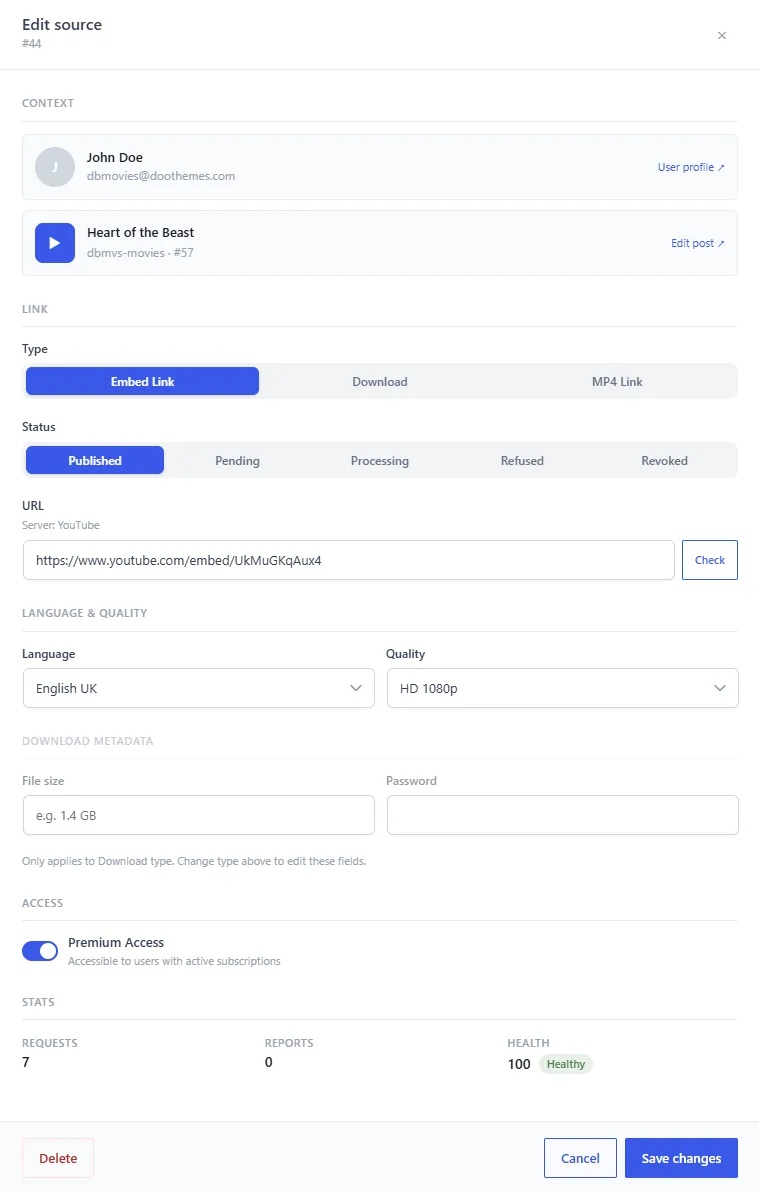
Importing links from a spreadsheet
To add many links at once, open the arrow next to Add link and choose Import links.
1. Prepare the file
- Format: an
.xlsxor.csvfile, up to 5,000 rows and 10 MB. Split larger files. - Template: click Download template to start from the right format. It has a Links sheet with the column names and a Help sheet with examples and every accepted value.
- What is read: only the first sheet. Its first row must have the column names. Columns are matched by name; unknown columns are ignored.
- Privacy: the file is read in your browser and never uploaded. Only its rows are sent to be checked.
| Column | Required | What to write |
|---|---|---|
tmdb_id | One of the two | TMDb ID of the movie, or of the TV show for an episode |
imdb_id | One of the two | IMDb ID (tt1234567) of the movie, or of the TV show for an episode |
season | Episodes only | Season number |
episode | Episodes only | Episode number |
url | Yes | The link |
type | Yes | Embed, Download or MP4 |
language | No | Audio language code, like es-MX or en-US |
quality | No | Like 1080p, 720p or 4K |
status | No | Empty means Published. Also Pending, Processing, Refused or Revoked |
premium | No | yes if only members can use it (also 1, sí or x) |
filesize | No | Downloads only, like 1.5 GB |
password | No | Downloads only |
A row without season and episode is a movie. With both, it is an episode of the TV show with that ID. The panel lists every accepted type, status, quality and language; click a value to copy it.
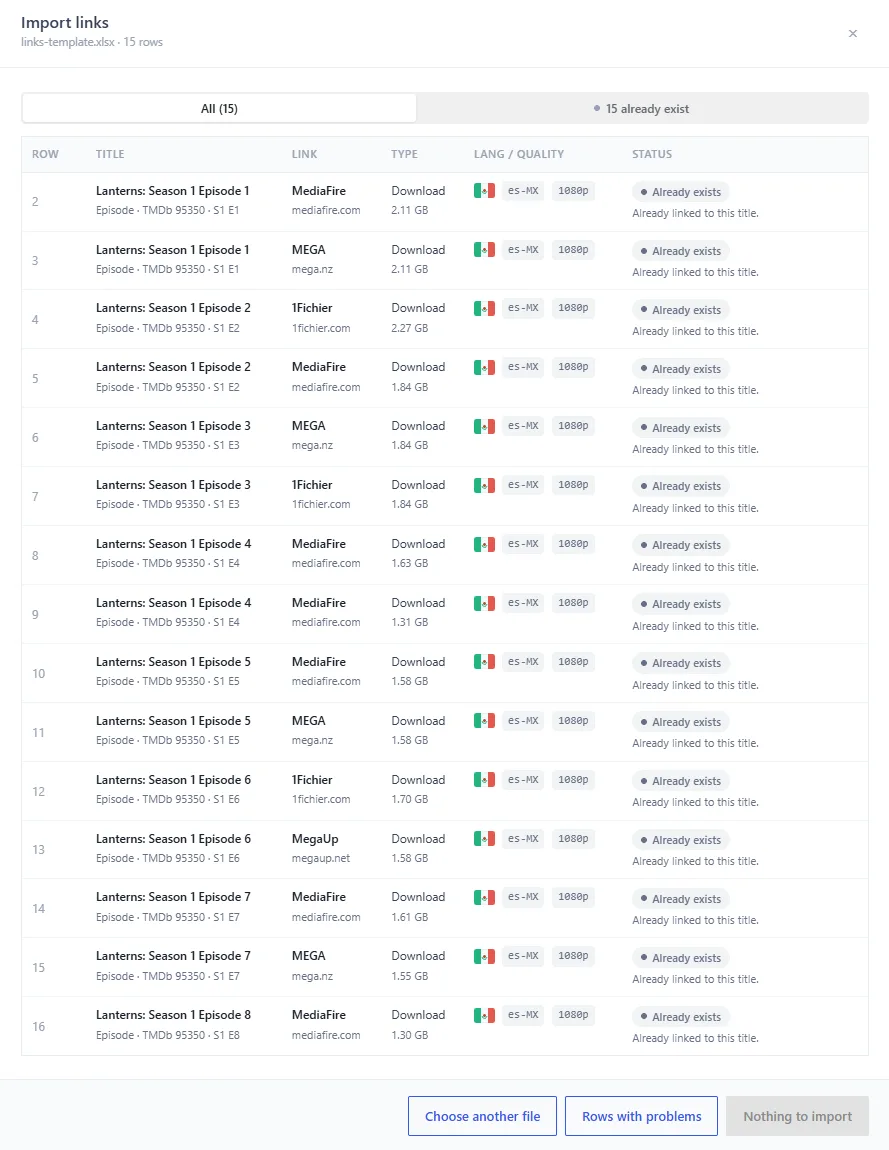
2. Review the rows
Drop the file in the panel. Nothing is saved yet: Dbmovies checks each row and shows a preview with the title it found, the link host, the type, language and quality, and its state:
- Ready: it will be imported.
- Already exists: that URL is already on your site. It is skipped.
- Repeated: the file has that URL in an earlier row. Only the first one counts.
- Not found: there is no title with that ID, or the TV show has no such episode.
- Not published: the title exists but is not published.
- Error: a value is not valid. The row tells you which one, for example an unknown quality.
The title must already be imported and published: the import does not create titles. Filter the rows by state, and click Rows with problems to download them, fix them and upload them again.
3. Import
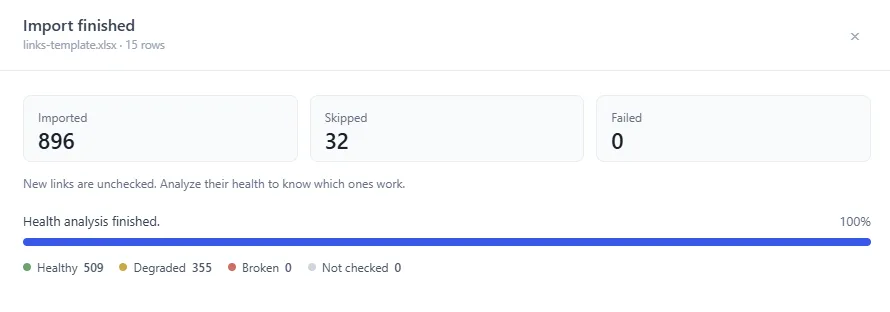
Click Import N links. Ready rows are saved in batches, with a progress bar and a Stop button. Keep the panel open until it finishes. If it stops, upload the same file again: links already imported are skipped.
4. Check their health
Imported links come in unchecked. The last step offers Analyze health, which checks only the links you just imported. Rows not imported downloads the rows that were not saved.
Deleting links
Deleting a link removes it for good: it disappears from your site and from the list, and it cannot be undone. Only administrators can delete links here.
- From the list: click Delete on its row and confirm. Broken links (health 1–49) are deleted without asking, so you can clean them up quickly.
- From the edit panel: click Delete at the bottom left, then click again within 4 seconds to confirm.
Links are also deleted when:
- their movie or episode is deleted permanently (moving it to the trash keeps them);
- a TV show is deleted permanently, together with its episodes;
- the user who added them is deleted;
- a weekly task finds links whose movie or episode no longer exists.
How links reach your visitors
Your theme never shows the real URL of a link. Each link has a unique hash, and the player opens it through /sources/go/{hash}. That route checks the subscription of the visitor for premium links before opening the source, and counts each opening in the Requests column.
Tools
Tools, at the top of the Links screen, opens:
- Analyze link health: checks every link with its host and scores its health. See Analyze link health.
- Domain exchanger: replaces a domain in every link at once, when a host changes its address. See Sources domain exchanger.