Dbmovies
Firewall
The Firewall protects the sign-in, sign-up, password reset and contact forms: it blocks IP addresses and ranges, and checks email addresses to reject disposable ones. This page explains each setting and the limits that are always on.
Overview
The Firewall protects the public forms of Dbmovies:
- Sign in, also with Google.
- Sign up.
- Password reset.
- The contact form.
It has two parts: an IP address blacklist, and an email verification that checks addresses with the Doothemes verification service. You set both in Dbmovies › Settings › Firewall. On top of these settings, the same forms limit repeated attempts on their own: see Built-in limits.
The firewall covers these forms, not the rest of your site. A blocked address can still browse your pages, and the WordPress login page (wp-login.php) is not covered. For site-wide protection, add a security plugin of your choice.
IP Address Blacklist
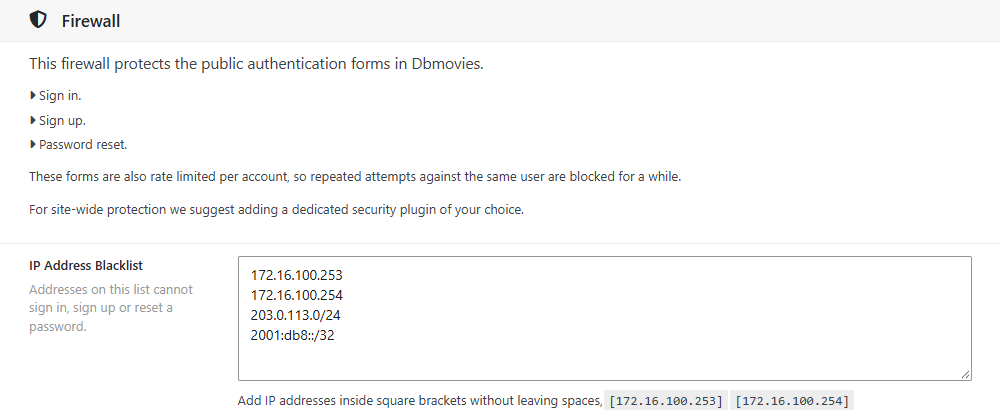
Addresses on the list cannot sign in, sign up, reset a password or send a message from the contact form. Instead, they see this message: Your location is not allowed, please cease and desist from any action.
Write the list in IP Address Blacklist:
- One address or range per line, IPv4 or IPv6.
- A range uses CIDR notation:
203.0.113.0/24blocks every address from203.0.113.0to203.0.113.255. - Lines that are not a valid address are ignored.
203.0.113.7
203.0.113.0/24
2001:db8::/32
The format of earlier versions, [203.0.113.7][198.51.100.9], still works. Before Dbmovies 1.3.37, it was the only format that worked: if your list has one address per line, update Dbmovies.
Find the address to block
Each message in Dbmovies › Contact shows the IP address of its sender. For the other forms, look in the access logs of your server or in your security plugin.
The blacklist never blocks the WordPress admin, so you cannot lock yourself out with it.
Behind Cloudflare, a proxy or a load balancer
Dbmovies reads the real address of each visitor, and it does not trust headers that a visitor could fake:
- Cloudflare: detected on its own.
- A proxy on your own server or private network, such as Nginx in front of Apache: detected on its own.
- A load balancer or a CDN with a public address: add its ranges with the
dbmovies_trusted_proxiesfilter, or set your server to restore the real address (mod_remoteipin Apache,real_ipin Nginx).
add_filter('dbmovies_trusted_proxies', function ($ranges) {
    $ranges[] = '198.51.100.0/24'; // Your load balancer.
    return $ranges;
});
If Dbmovies sees the address of your proxy instead of your visitors, all of them share one address: blocking it blocks everyone, and the limits per address fill up for all of them. The Contact inbox is a quick check: if every message shows the same IP address, that is the case.
Email verification
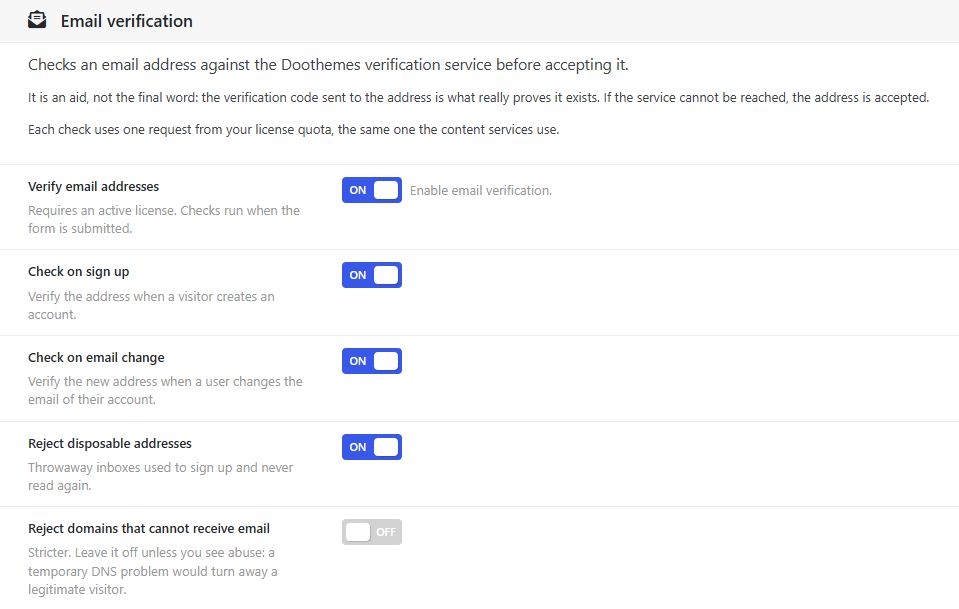
With Verify email addresses on, Dbmovies checks an email address with the Doothemes verification service before accepting it:
- Check on sign up: when a visitor creates an account, also with Google. On by default.
- Check on email change: when a member changes the email of their account. On by default.
Then choose what to reject:
| Setting | What it rejects | Default |
|---|---|---|
| Reject disposable addresses | Throwaway inboxes, from services that give out temporary addresses | On |
| Reject domains that cannot receive email | Domains with no mail server | Off |
Leave the second one off unless you see abuse: a temporary DNS problem would turn away a legitimate visitor. Other results of the service, such as a domain that accepts any address, never reject an address.
Visitors whose address is rejected see why, and can use a different one:
- Disposable email addresses are not allowed. Please use a permanent address.
- That email domain cannot receive messages. Please check the address.
An aid, not the final word
What proves that an address exists is the verification code that Dbmovies sends to it. The check only stops bad addresses earlier. That is why Dbmovies accepts the address when the service cannot be reached, when it takes longer than 8 seconds to answer, or when your license has no requests left.
Requests and your license
Email verification needs an active license. Each check uses one request of your daily limit, the same limit as IMDb data: see License activation. If you have more than one active license on your site, for example a Dbmovies license and a Wovie license, the check continues with the next one when the first runs out.
On an email change, the check runs only after the member enters the right password, so failed attempts do not use requests.
Built-in limits
These limits are always on, and they have no setting:
| What | Limit |
|---|---|
| Attempts for one account, by email or username | 5 every 15 minutes, in each of sign in, sign up and password reset |
| Verification codes sent to visitors from one IP address | 5 every 15 minutes |
| Failed Google sign-ins and new Google accounts from one IP address | 10 every 15 minutes |
| Contact messages | 3 every 10 minutes from one IP address, and 5 a day from one email address |
A visitor who reaches a limit sees a message that asks them to try again later, and can do it when the time has passed. The limits per account stop attacks against one account from many addresses. The limits per address stay high enough for a whole office or a mobile network, where many people share one address.
More protection
- Cloudflare Turnstile stops bots on the same four forms, usually without a puzzle. Set it up in Dbmovies › Settings › Integrations.
- The contact form also blocks most automated spam on its own, with no setting.
- A security plugin protects the rest of your site, including
wp-login.php.
Check your firewall
- Blacklist: add your own IP address to the list and save. In a private window, try to sign in on your site: you see the blocked message. Then remove your address from the list.
- Email verification: in a private window, sign up with an address from a temporary email service. The form rejects it. This check uses one request of your daily limit.
If you use a page cache, it does not affect the firewall: the forms check every request on the server.