Dbmovies
Extend permalink
A step-by-step guide to configuring the addresses of your Dbmovies site: the permalink structure of WordPress, the base of each type of content, the permalink template of your titles and the pages of the member area, with complete examples and what to keep in mind once your site is published.
Overview
You can configure every part of the addresses of your Dbmovies site: the word before your movies, the way the name of each title is written, the pages of the member area and more. This guide goes through each part step by step, shows complete setups you can copy, and explains what to keep in mind once your site is published.
The best time to do this is before you import your catalog and open your site. Changing addresses later is possible, but it takes extra work: see Change an address on a published site.
The parts of an address
Take the address of a movie:
https://your-website.com/movies/1234-fight-clubmoviesis the base. You set it in Settings › Permalinks, for each type of content and each taxonomy.1234-fight-clubis the permalink of the title. Dbmovies writes it when it imports the title, from a template.- Anything between your domain and the base comes from the permalink structure of WordPress. With the recommended structure, there is nothing.
You set each part in its own step.
Step 1: The permalink structure of WordPress
Go to Settings › Permalinks. Under Permalink structure, the option you choose changes the addresses of your blog posts, and it can also change the addresses of Dbmovies:
| Structure | The address of a movie |
|---|---|
| Plain | Not supported. Sign in, the member account and the search need pretty permalinks |
| Day and name, Month and name or Post name | /movies/1234-fight-club/ |
Numeric, /archives/%post_id% | /archives/movies/1234-fight-club |
Custom Structure, /%postname% (recommended) | /movies/1234-fight-club |
Custom Structure, /blog/%postname%/ | /blog/movies/1234-fight-club/ |
Two things come from the structure:
- A fixed word at the start, such as
/archives/or/blog/, goes before every Dbmovies address too. - The slash at the end: if the structure ends with
/, every address of your site ends with/.
We recommend Custom Structure with /%postname%, without a slash at the end. See Initial settings.
Step 2: The bases
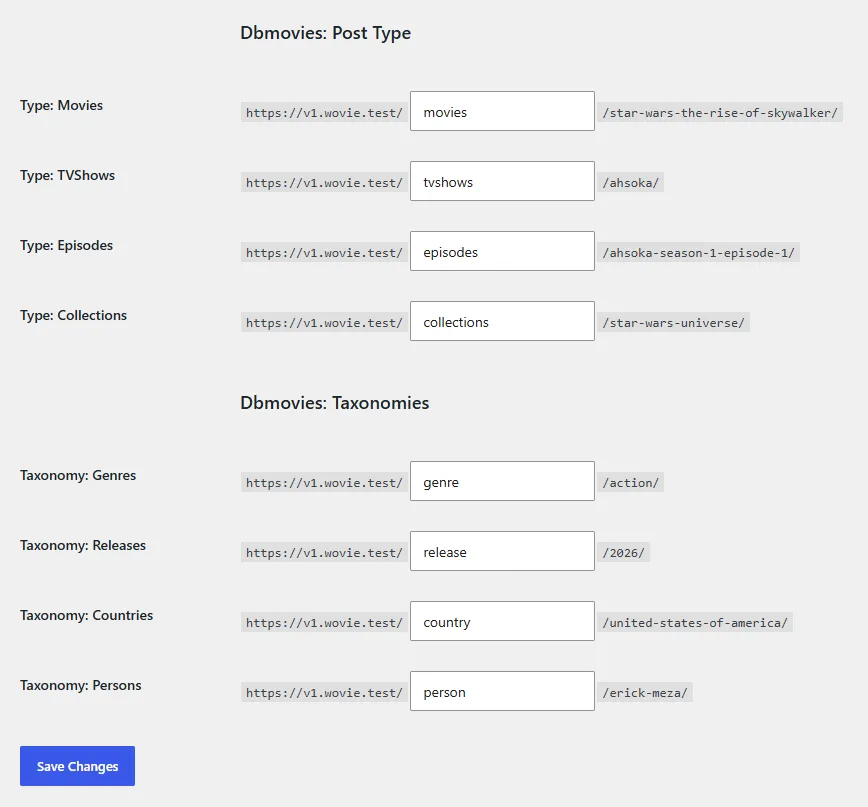
On the same page, scroll down to the Dbmovies: Post Type and Dbmovies: Taxonomies sections. Each field is the base of one type of content or taxonomy:
| Field | Default | Address |
|---|---|---|
| Type: Movies | movies | /movies/1234-fight-club |
| Type: TVShows | tvshows | /tvshows/1235-ahsoka |
| Type: Episodes | episodes | /episodes/1236-ahsoka-se-1-ep-1 |
| Type: Collections | collections | /collections/star-wars |
| Taxonomy: Genres | genre | /genre/action |
| Taxonomy: Releases | release | /release/2024 |
| Taxonomy: Countries | country | /country/japan |
| Taxonomy: Persons | person | /person/pedro-pascal |
- Lists: the base of movies, TV shows and collections is also the address of their full list:
/movies/,/tvshows/and/collections/. - Episodes: when a visitor opens the address of an episode, Dbmovies takes them to its TV show, at that episode:
/tvshows/1235-ahsoka/?season=1&episode=1. - Tags: tags are the tags of WordPress. Their base is Tag base, in the Optional section of the same page, and it is
tagby default.
Write the words you want and click Save Changes. Dbmovies refreshes the addresses of your site on its own.
Rules for a base
- Letters, numbers and hyphens. WordPress cleans the word when you save:
Películasbecomespeliculas, andwatch/moviesbecomeswatch-movies. A base is always a single word or words joined by hyphens. - Different for each type. Do not use the same word for two types. Do not use the slug of one of your pages either: if a page is called
moviesand so is the base of movies, the list of movies takes the address and the page can no longer be opened. - Not
searchorsource. Dbmovies uses them for the search and for the links to watch or download. - Never empty. If a field is left empty, Dbmovies uses the default.
Step 3: The permalink of each title
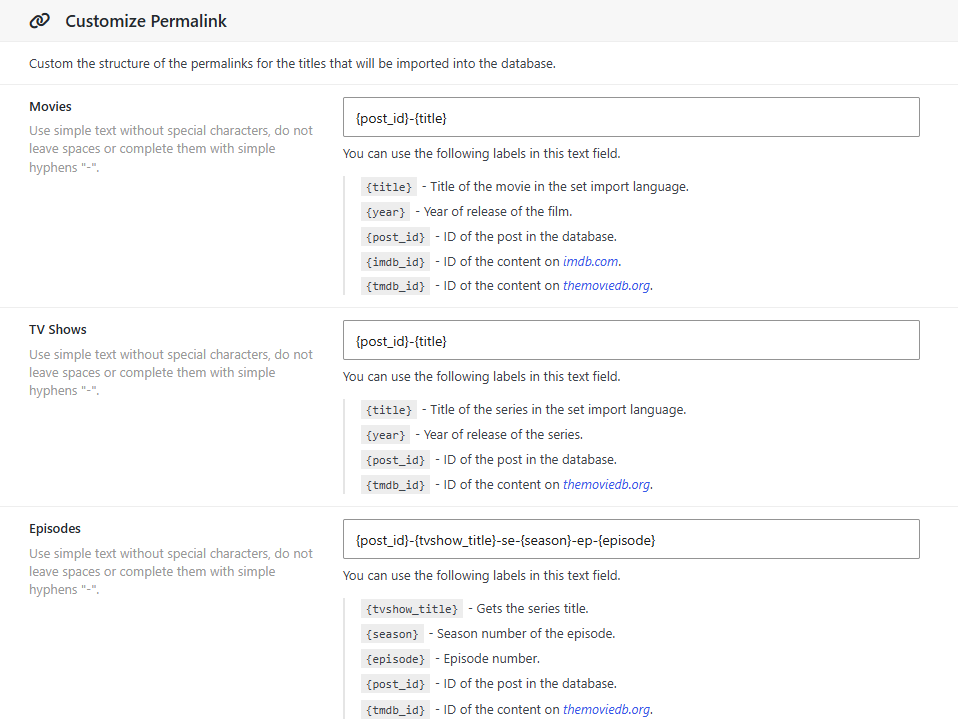
Go to Dbmovies › Settings › Data Importer › Titles / Content. The Permalink template of each type writes the last part of the address when Dbmovies imports a title:
| Type | Default template | Result |
|---|---|---|
| Movies | {post_id}-{title} | 1234-fight-club |
| TV Shows | {post_id}-{title} | 1235-ahsoka |
| Episodes | {post_id}-{tvshow_title}-se-{season}-ep-{episode} | 1236-ahsoka-se-1-ep-1 |
The markers in braces are replaced with the data of each title. WordPress then writes the result in lowercase, turns spaces into hyphens, and removes accents and other characters. Some templates you can use:
| Template | The movie Fight Club (1999) |
|---|---|
{post_id}-{title} | 1234-fight-club |
{title}-{year} | fight-club-1999 |
{title}-{imdb_id} | fight-club-tt0137523 |
{original_title}-{year} | The original title, whatever your import language. For Amélie: le-fabuleux-destin-damelie-poulain-2001 |
And for episodes:
| Template | Ahsoka, season 1, episode 1 |
|---|---|
{post_id}-{tvshow_title}-se-{season}-ep-{episode} | 1236-ahsoka-se-1-ep-1 |
{tvshow_title}-{season}x{episode} | ahsoka-1x1 |
- Unique addresses.
{post_id}makes every address unique. Without it, two movies called Halloween end up ashalloweenandhalloween-2.{year}or{imdb_id}also tell most titles apart. - The language of the address.
{title}uses your import language, so a site in Spanish getsel-club-de-la-pelea.{original_title}keeps the original name. - Titles already imported. A new template applies to the titles you import from then on. Titles already on your site keep their address, unless an update rewrites it: see Change an address on a published site.
The full list of markers is in Titles and content.
Collections and taxonomies
Collections, genres, years, countries and persons are not written from a template. Their permalink is their slug, which WordPress makes from their name: the genre Ciencia ficción gets ciencia-ficcion. To change it, edit the Slug field in their editor or in Quick Edit.
Step 4: Sign in and the member account
The addresses of the member area follow the slugs of their pages:
| Page | Default slug | Addresses |
|---|---|---|
| Authentication | auth | /auth/login, /auth/signup |
| Account | account | /account/, /account/plans |
To change them, edit the slug of the page in Pages, for example auth to sign-in. Every form and section moves with it: /sign-in/login. The last part, such as login or plans, is fixed. See Required pages.
The search, /search/inception, and the links to watch or download, /source/…, have fixed addresses.
Example setups
A site in Spanish
In Settings › Permalinks:
| Field | Value |
|---|---|
| Type: Movies | peliculas |
| Type: TVShows | series |
| Type: Episodes | episodios |
| Type: Collections | colecciones |
| Taxonomy: Genres | genero |
| Taxonomy: Releases | estreno |
| Taxonomy: Countries | pais |
| Taxonomy: Persons | reparto |
| Tag base | etiqueta |
With the default templates and Spanish as your import language, your addresses look like this:
https://your-website.com/peliculas/1234-el-club-de-la-pelea
https://your-website.com/series/1235-ahsoka
https://your-website.com/genero/ciencia-ficcion
https://your-website.com/estreno/2024
https://your-website.com/pais/japon
https://your-website.com/reparto/pedro-pascal
You can also rename the pages of the member area, for example auth to acceso and account to mi-cuenta.
Short addresses
In Settings › Permalinks, use movie, tv and episode as the bases of movies, TV shows and episodes. In Titles / Content, use {title}-{year} for movies and TV shows, and {tvshow_title}-{season}x{episode} for episodes:
https://your-website.com/movie/fight-club-1999
https://your-website.com/tv/ahsoka-2023
https://your-website.com/episode/ahsoka-1x1
Without {post_id}, two titles with the same name and year still share an address, and WordPress adds -2 to the second one.
A site with a blog
If your blog uses /blog/%postname%/, Dbmovies addresses get /blog/ too, such as /blog/movies/1234-fight-club/. To keep your blog at /blog/ and your catalog at the root of your site, ask your developer to use the filter in For developers.
Check your addresses
- Click Save Changes in Settings › Permalinks, even if you did not change anything there.
- Open a movie, a TV show, a genre and the search, and look at their addresses.
- If one shows a 404 page:
- check that no page uses the same slug as a base;
- check that the permalink structure is not Plain;
- click Save Changes again.
Change an address on a published site
This is what happens to the old addresses when you change a part on a published site:
| What you change | The old addresses |
|---|---|
| The permalink of a movie, TV show, episode or collection | WordPress takes visitors to the new address |
| The base of movies or TV shows | WordPress usually finds the title and takes visitors to it. It is a guess, so add a redirect anyway |
| The base of episodes, collections or a taxonomy | They show a 404 page. Add a redirect |
| The slug of a genre, year, country or person | It shows a 404 page. Add a redirect |
| The permalink template | Nothing, until an update rewrites the address of a title |
The permalink of a title also changes with every update of the Metaupdater if Update Custom Permalinks is checked. On a published site, uncheck it: see Metaupdater.
Add a redirect
A permanent redirect (301) takes visitors and search engines from the old address to the new one. For example, to move the genre pages from genre to genero:
- With the free Redirection plugin: add a redirect with the source
^/genre/(.*)and the target/genero/$1, and turn on Regex. - On Apache, in
.htaccess, before the WordPress rules:
RedirectMatch 301 ^/genre/(.*)$ /genero/$1- On Nginx, in the
serverblock:
rewrite ^/genre/(.*)$ /genero/$1 permanent;Then submit your sitemap again in Google Search Console.
Search engines
- Your sitemap is at
/wp-sitemap.xml. It lists your movies, TV shows, collections, and the pages of genres, years, countries and persons. Episodes are not listed since Dbmovies 1.3.37, because their address opens the TV show. If an SEO plugin makes your sitemap, exclude episodes there too. - Choose your words once. Addresses in the language of your visitors help them and search engines. Choose them before you open your site, and keep them.
For developers
To go further than these settings, use the register_post_type_args and register_taxonomy_args filters of WordPress. For example, to keep the movie addresses at /movies/… when your permalink structure starts with /blog/:
add_filter('register_post_type_args', function ($args, $post_type) {
    if ($post_type === 'dbmvs-movies') {
        $args['rewrite']['with_front'] = false;
    }
    return $args;
}, 10, 2);
The content types are dbmvs-movies, dbmvs-tvshows, dbmvs-episodes and dbmvs-collections. The taxonomies are dbmvs-genres, dbmvs-releases, dbmvs-countries and dbmvs-persons. After you add a filter like this, go to Settings › Permalinks and click Save Changes.