Dbmovies
Import limits
Import limits sets how much of each title's data is imported from TMDb: tags, cast, directors, creators, backdrops and logos. This page explains what each limit changes on your site and how it affects import speed.
Overview
TMDb has a lot of data for each title: dozens of keywords, the full cast, every backdrop and logo uploaded by its community. Dbmovies › Settings › Data Importer › Import Limits sets how much of it each title gets.
Higher limits give richer pages, but imports take longer and your database grows faster. The defaults are a good balance for most sites.
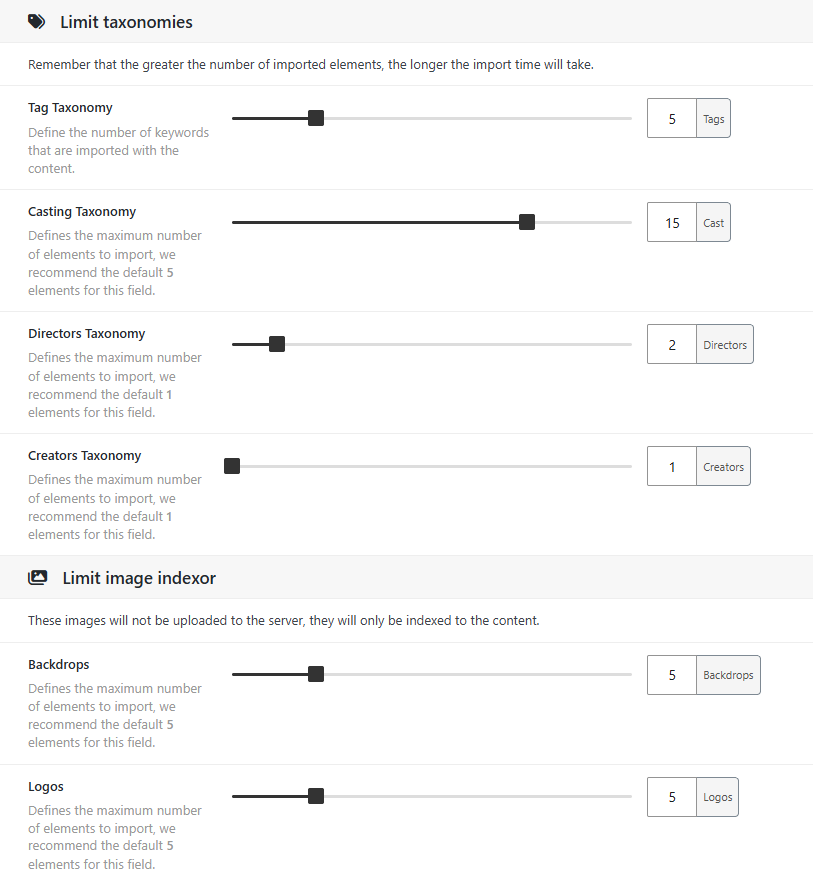
Limit taxonomies
| Setting | What it limits | Range | Default |
|---|---|---|---|
| Tag Taxonomy | Tags of each title, taken from the TMDb keywords | 1 to 20 | 5 |
| Casting Taxonomy | Actors of each movie and TV show, in the order of the credits | 1 to 20 | 5 |
| Directors Taxonomy | Directors of each movie | 1 to 10 | 1 |
| Creators Taxonomy | Creators of each TV show | 1 to 10 | 1 |
Actors, directors and creators are saved as persons, each with their own page, photo and biography.
- Each new person takes time. The first time a person is imported, Dbmovies reads their profile from TMDb. A higher cast limit means slower imports, especially at the start, when most persons are new.
- Persons build your person pages. The more actors you import, the more complete the filmographies on your site, and the more recurring cast your collections can show.
These limits only apply if the taxonomy is checked in Taxonomies, in Data importer.
Limit images
These images are not uploaded to your server: Dbmovies saves their addresses, and they are loaded from your CDN or from TMDb. See Import images.
| Setting | What it limits | Range | Default |
|---|---|---|---|
| Backdrops | Backdrops saved with each title | 1 to 20 | 5 |
| Logos | Logos saved with each title | 1 to 20 | 5 |
- Backdrops: in Wovie, the background of a title page changes among its backdrops every few seconds, and visitors can shuffle them.
- Logos: the title page shows only the main logo. The others are kept in the Images tab of the Metadata box, as More Logos, in case you want to use one of them as Main Logo. If you set your own main logo, updates keep it.
Changing a limit
A new limit applies to the titles you import from then on. Titles you already have change when they are updated:
- Cast, directors and creators follow the new limit: raising it adds persons, lowering it removes the extra ones. A person that no title uses anymore is deleted.
- Tags only grow: updates add new tags, but never remove the ones a title has.
- Backdrops and logos are replaced with the new number.
To apply a new limit to your whole catalog, run the Meta Updater.